How to Automate Repetitive Tasks in Business: The 2026 Practical Framework
A complete 2026 operational guide on how to automate repetitive tasks in business: task audit frameworks, deterministic workflow engines, autonomous AI agents, and ROI formulas.

How to Automate Repetitive Tasks in Business: The 2026 Practical Framework for Explosive Productivity and Zero Errors
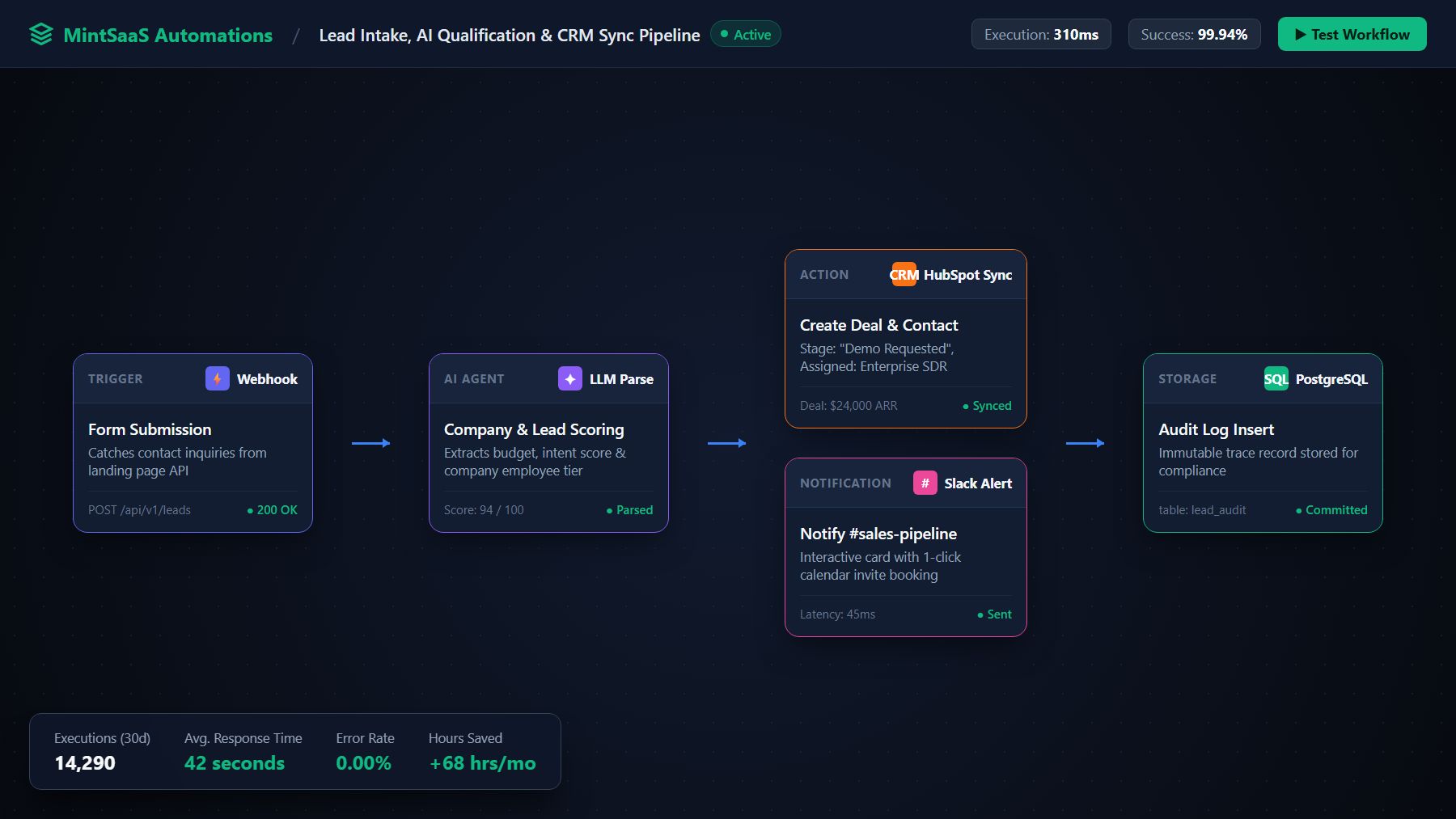
Executive Summary (AEO Direct Answer): How do you automate repetitive tasks in business? To successfully automate repetitive tasks in business in 2026, follow a systematic 5-stage framework: (1) Identify and audit operational bottlenecks using the 3-Filter Rule (assessing task frequency, predictability, and error sensitivity); (2) Standardize data inputs and validation rules before building integrations; (3) Deploy modern workflow automation tools—combining deterministic workflow platforms like n8n for API-to-API data transfer, autonomous AI agents for unstructured communications, and specialized document utilities for file handling; (4) Implement Human-in-the-Loop (HITL) approval gates and dead-letter failure alerts; and (5) Track operational ROI by measuring recovered employee hours, reduced manual errors, and cycle-time velocity. Companies that implement business process automation consistently eliminate 60% to 80% of administrative overhead while accelerating revenue cycles.
Every growing company eventually hits the "friction wall." In the early days of a business, manual processes feel harmless: an operations manager copy-pastes customer orders into a spreadsheet, a sales development representative manually updates deal stages in a CRM, an accountant re-types PDF invoice numbers into an accounting ledger, and a support specialist manually replies to the same customer inquiries dozens of times a day.
However, as order volume and customer requests grow, these manual chores compound into an operational tax that drains profits and burns out talent. Industry research from McKinsey reveals that knowledge workers spend over 28% of their entire work week simply managing emails, searching for internal data, and performing manual data entry.
Worse still, manual execution is inherently fragile. A single transposed digit in a customer billing address, an overlooked lead in an inbox, or a delayed contract handover cascades into lost revenue, dissatisfied clients, and expensive compliance errors.
Understanding how to automate repetitive tasks in business is no longer a luxury reserved for Fortune 500 corporations with multi-million-dollar IT budgets. With modern visual workflow platforms, modular API tools, and autonomous AI reasoning agents, any company—from solo entrepreneurs utilizing our MintSaaS Productivity Solutions to growing service firms—can build an automated, self-healing operating system.
In this definitive guide, we break down the exact strategies, software stacks, real-world workflow recipes, and mathematical ROI formulas needed to automate repetitive tasks in business and free your team to focus on high-leverage growth.
1. What Are Repetitive Tasks in Business (and What Do They Really Cost)?
Before deploying software, you must clearly distinguish between tasks that require human creativity and those that are purely algorithmic friction when evaluating how to automate repetitive tasks in business.
A repetitive task in business is any operational activity that follows predictable, rule-governed logic, requires recurring data handling across disparate software applications, and demands little to no strategic or emotional intelligence.
The True Hidden Costs of Manual Work
When business owners evaluate the cost of manual operations, they often look only at hourly wages. But manual execution imposes three hidden multipliers:
- The Human Error Multiplier: Human data entry carries an average error rate between 1% and 4%. In finance, logistics, or healthcare, correcting a single downstream invoice discrepancy or shipping mismatch costs between $50 and $200 in labor, phone calls, and lost customer trust.
- Context Switching and Cognitive Fatigue: The American Psychological Association highlights that shifting between disjointed tasks (e.g., answering a customer ticket, opening an ERP, updating a spreadsheet, checking Slack) can consume up to 40% of an employee’s productive time.
- Opportunity Cost: When high-salaried account executives spend 90 minutes per day manually logging notes into a CRM instead of pitching prospects, the business pays twice—once in salary, and again in lost pipeline revenue. Learning how to automate repetitive tasks in business directly redirects that energy into closing deals.
2. The Task Audit: How to Identify What to Automate First
The most common mistake leaders make when learning how to automate repetitive tasks in business is attempting to automate every internal process all at once. Automation without triage leads to brittle, unmaintainable pipelines.
To determine where to begin when you automate repetitive tasks in business, evaluate every daily workflow through the 3-Filter Rule:
- Frequency: Does this task occur daily or multiple times per week?
- Predictability: Does the process follow standardized if/then rules or structured data schemas?
- Error Sensitivity: Does manual execution frequently lead to typos, missed deadlines, or customer complaints?
If an operational task meets all three criteria, it is a prime candidate for immediate business process automation.
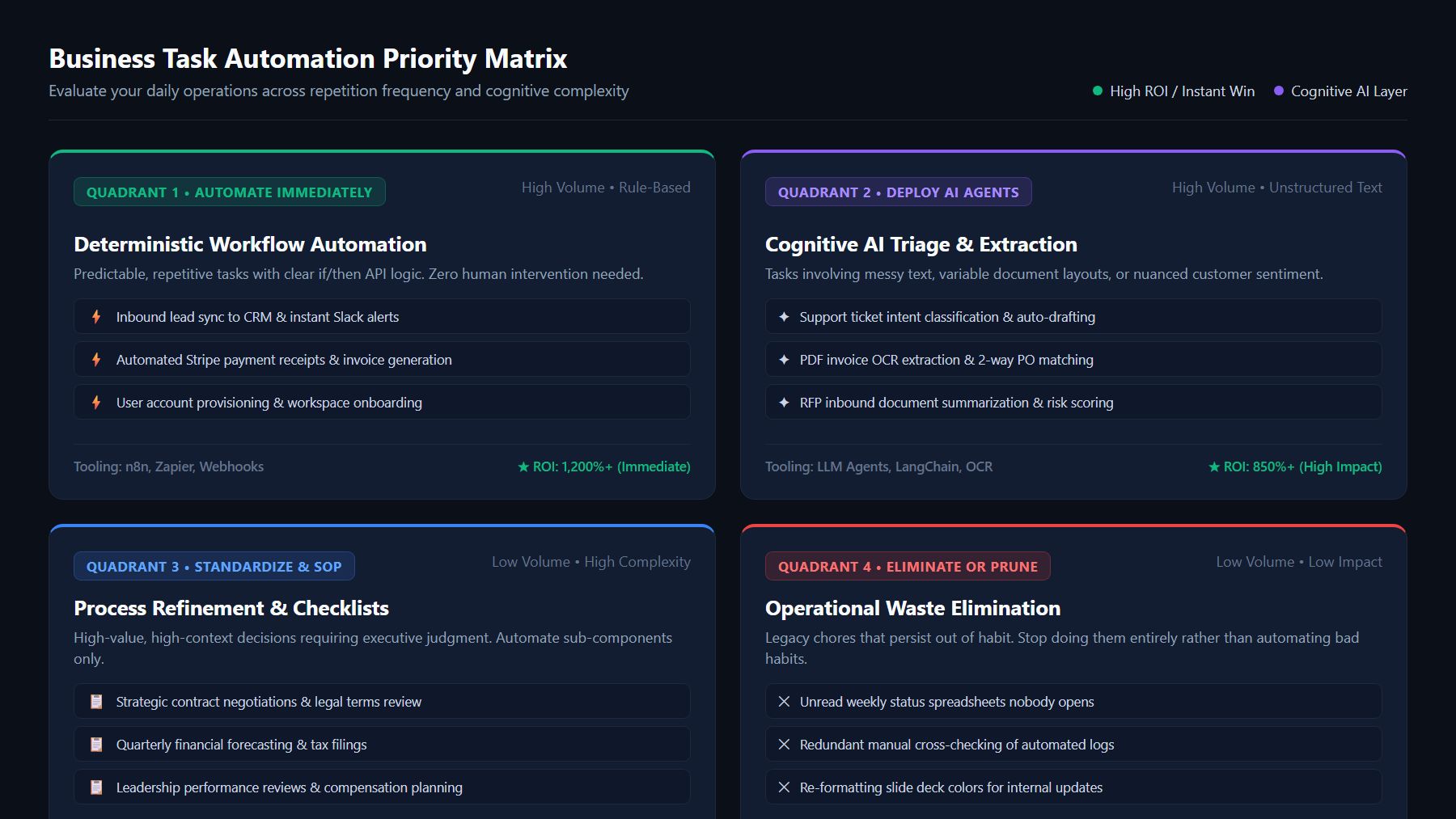
The 4-Quadrant Automation Priority Matrix
| Quadrant | Repetition Level | Complexity / Cognitive Demand | Strategic Action | Typical Business Examples |
|---|---|---|---|---|
| Quadrant 1: Automate Immediately | High (Daily / Hourly) | Low (Deterministic rules) | Build instant API workflows | Form-to-CRM sync, payment receipts, Slack alert notifications |
| Quadrant 2: Deploy AI Agents | High (Daily / Hourly) | Medium to High (Unstructured text) | Deploy autonomous AI agents | Support email classification, inbound RFQ review, invoice line extraction |
| Quadrant 3: Standardize & Document | Low (Monthly / Quarterly) | High (Requires strategic judgment) | Create SOPs, automate sub-steps | Financial quarterly close, performance reviews, complex contract drafting |
| Quadrant 4: Eliminate or Prune | Low (Infrequent) | Low (Low business value) | Stop doing entirely | Unread weekly status spreadsheets, manual cross-checking of redundant logs |
3. The Modern Business Automation Stack in 2026
Business process automation has fundamentally evolved past the era of rigid, fragile scripts, transforming how to automate repetitive tasks in business with modern low-code architectures. To understand how to automate repetitive tasks in business effectively, you must understand how today's modern automation ecosystem operates across four modular layers:
┌────────────────────────────────────────────────────────┐
│           Layer 4: Autonomous AI Agent Layer           │
│   (Unstructured triage, semantic synthesis, tools)    │
└───────────────────────────┬────────────────────────────┘
                            │
┌───────────────────────────▼────────────────────────────┐
│      Layer 3: Deterministic Workflow Engine (iPaaS)    │
│  (n8n, Zapier, Webhooks, Data Routers, Error Handlers) │
└───────────────────────────┬────────────────────────────┘
                            │
┌───────────────────────────▼────────────────────────────┐
│      Layer 2: Core SaaS Apps, Databases & APIs         │
│     (CRM, Stripe, PostgreSQL, Email, Storage, ERP)     │
└───────────────────────────┬────────────────────────────┘
                            │
┌───────────────────────────▼────────────────────────────┐
│         Layer 1: Purpose-Built Micro-Utilities         │
│   (PDF manipulation, Image batching, OCR extractors)   │
└────────────────────────────────────────────────────────┘
Layer 1: Core SaaS Applications and APIs
These are your fundamental systems of record: your MintSaaS Business CRM, Stripe payment gateway, PostgreSQL databases, Google Drive/Dropbox cloud storage, and email servers. Modern workflow automation relies on RESTful webhooks and standard JSON payloads rather than brittle browser screen scraping.
Layer 2: Deterministic Workflow Engines
Workflow orchestration tools act as the central nervous system connecting your applications when you automate repetitive tasks in business:
- n8n: The leading fair-code, self-hosted automation platform for teams that prioritize complete data privacy, complex branching logic, and custom JavaScript/Python execution. (For an architectural breakdown, see our in-depth n8n Platform Deep Dive & AI Agent Guide and our beginner-friendly overview on What is n8n?).
- Zapier / Make: Cloud-hosted, no-code visual workflow builders ideal for non-technical teams setting up simple linear integrations.
- GitHub Actions / Cron Services: Best for scheduled data batching, database backups, and developer infrastructure routines.
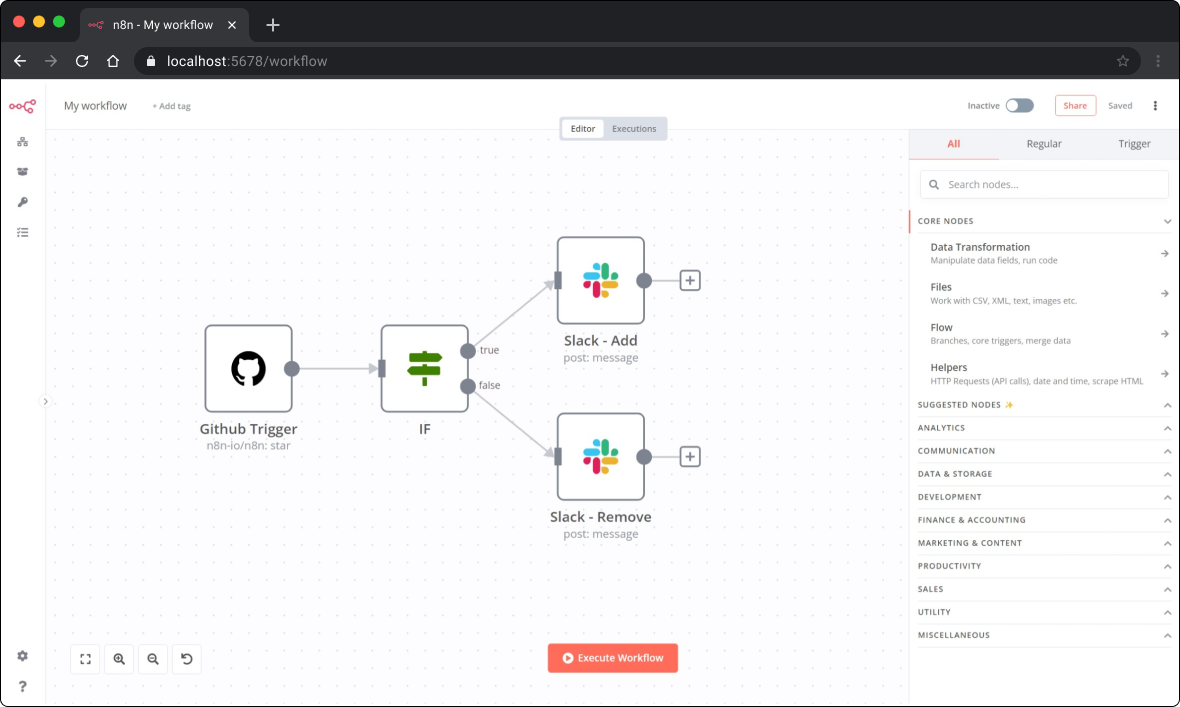
Layer 3: Autonomous AI Agents
While deterministic workflows execute rigid rules ("When an event occurs at point A, push data to point B"), AI agents handle ambiguity. Using large language models (LLMs) paired with vector search and function calling, AI agents can read messy incoming emails, extract structured line items from scanned PDF contracts, perform sentiment analysis, and draft personalized responses for human approval. Discover how lean teams scale this capability in our analysis of Autonomous AI Agents for Solopreneurs.
Layer 4: Purpose-Built Micro-Utilities
Not every task requires a complex multi-node cloud graph. Many daily office bottlenecks involve document transformations—such as merging PDF contracts, signing documents, batch compressing product catalog images, or stripping EXIF metadata. For these repetitive tasks in business, standalone web utilities like our MintSaaS PDF Toolkit and MintSaaS Image Compressor eliminate hours of manual software wrestling without recurring subscription bloat.
4. Architectural Comparison: Deterministic Workflows vs. AI Agents vs. Legacy RPA
Choosing the wrong technology when planning how to automate repetitive tasks in business creates unnecessary technical debt and fragile integrations. Review this comparison table to match your operational bottleneck with the right tool:
| Dimension | Deterministic Workflow Engines (e.g., n8n, Make) | Autonomous AI Agents (e.g., LangChain, OpenAI Agents) | Legacy Robotic Process Automation (RPA) |
|---|---|---|---|
| Primary Strength | 100% predictable, lightning-fast execution | Handles unstructured, messy, subjective text/data | Automates legacy desktop software without APIs |
| Failure Modes | API endpoint schema changes, network timeouts | Hallucinations, prompt drift, token cost spikes | Screen layout changes, OS updates, mouse coordinate shifts |
| Setup Cost | Low to moderate | Moderate | High (often requires specialized enterprise consultants) |
| Best Used For | Webhook routing, CRM updates, payment receipts | Customer support drafting, invoice classification | Mainframes, legacy banking or healthcare terminals |
| Data Privacy | High (especially with self-hosted Docker deployments) | Dependent on LLM provider data processing agreements | Moderate to Low (often records desktop screens) |
5. Five High-Impact Business Workflows You Can Automate Today
To see practical results when researching how to automate repetitive tasks in business, here are five battle-tested workflow blueprints that deliver measurable operational ROI within your first week of deployment.
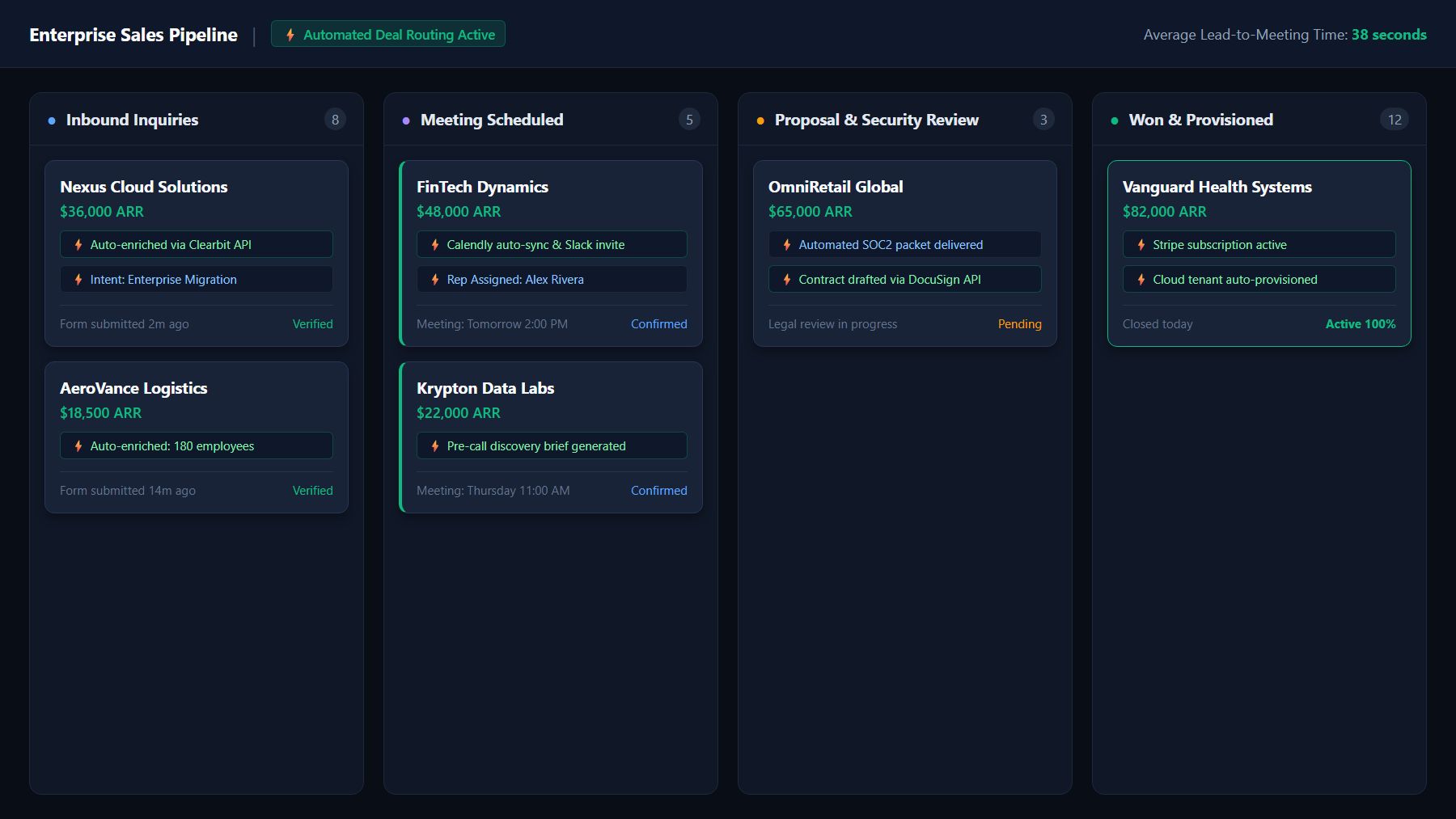
Workflow 1: Instant Lead Qualification, Enrichment, and Routing
- The Manual Nightmare: A prospect fills out a contact form on your website. The lead sits in an unread inbox for 6 hours until an SDR copies the details into a spreadsheet, manually looks up the company on LinkedIn, and assigns a sales rep. By the time the email is sent, the prospect has already scheduled a demo with a faster competitor.
- How to Automate This Repetitive Task in Business:
- Trigger: Webhook fires immediately upon form submission on your landing page.
- Enrichment: The workflow queries Clearbit or Apollo via API to append company size, industry, and annual revenue.
- Conditional Logic: If company size > 50 employees, route to Enterprise Tier; otherwise, route to Self-Serve Onboarding.
- Action: Automatically create the deal in your MintSaaS Business CRM, schedule an automated calendar invite, and dispatch an instant notification to the assigned account executive's private Slack channel with a 1-click dial link.
- Business Impact: Cuts lead response time from 6 hours to under 45 seconds, boosting lead-to-opportunity conversion rates by up to 391% according to Harvard Business Review sales studies.
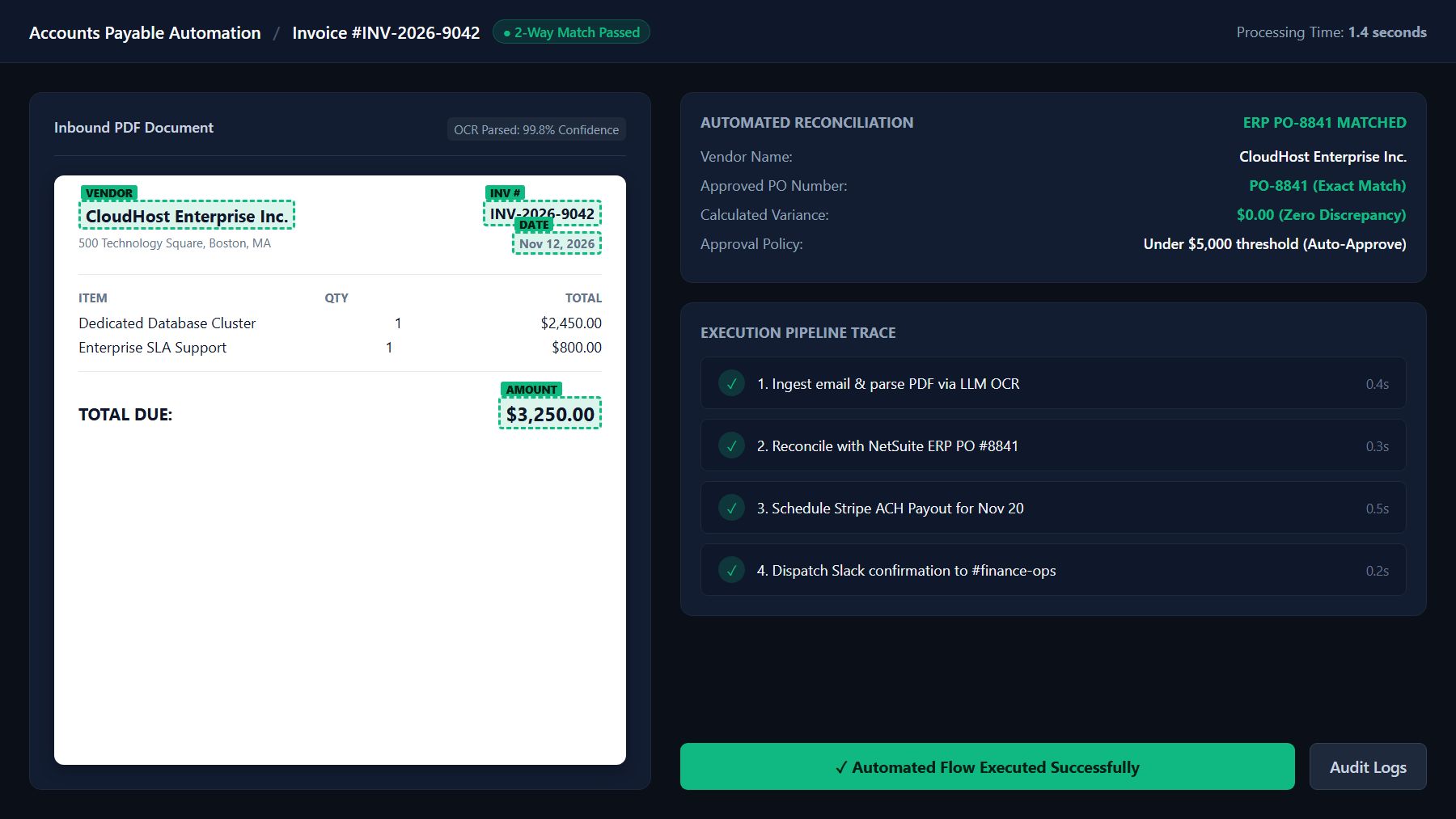
Workflow 2: Automated Accounts Payable & Invoice Processing
- The Manual Nightmare: Vendors email PDF invoices to an
invoices@company.cominbox. An accounts payable clerk downloads each PDF, opens QuickBooks, manually retypes the vendor name, invoice date, purchase order number, line items, and bank routing numbers, then asks a department head for payment approval. - How to Automate This Repetitive Task in Business:
- Trigger: Email arrives with an attached PDF invoice.
- Document Processing: The workflow extracts the PDF and runs it through an OCR parser or multimodal LLM prompt structured to output pure JSON:
     {
       "vendor_name": "CloudHosting Inc",
       "invoice_number": "INV-2026-8941",
       "total_amount_usd": 1450.00,
       "due_date": "2026-11-15",
       "line_items": [
         {"description": "Dedicated Compute Cluster", "cost": 1450.00}
       ]
}- Verification: The system performs a three-way reconciliation against your purchase order database.
- Approval Gate: If the total is under $2,000 and matches the approved PO, auto-queue the invoice in your accounting software; if it exceeds $2,000, post an interactive Slack message with [Approve] and [Reject] buttons.
- Business Impact: Eliminates 95% of manual invoice entry time and prevents costly duplicate payment errors.
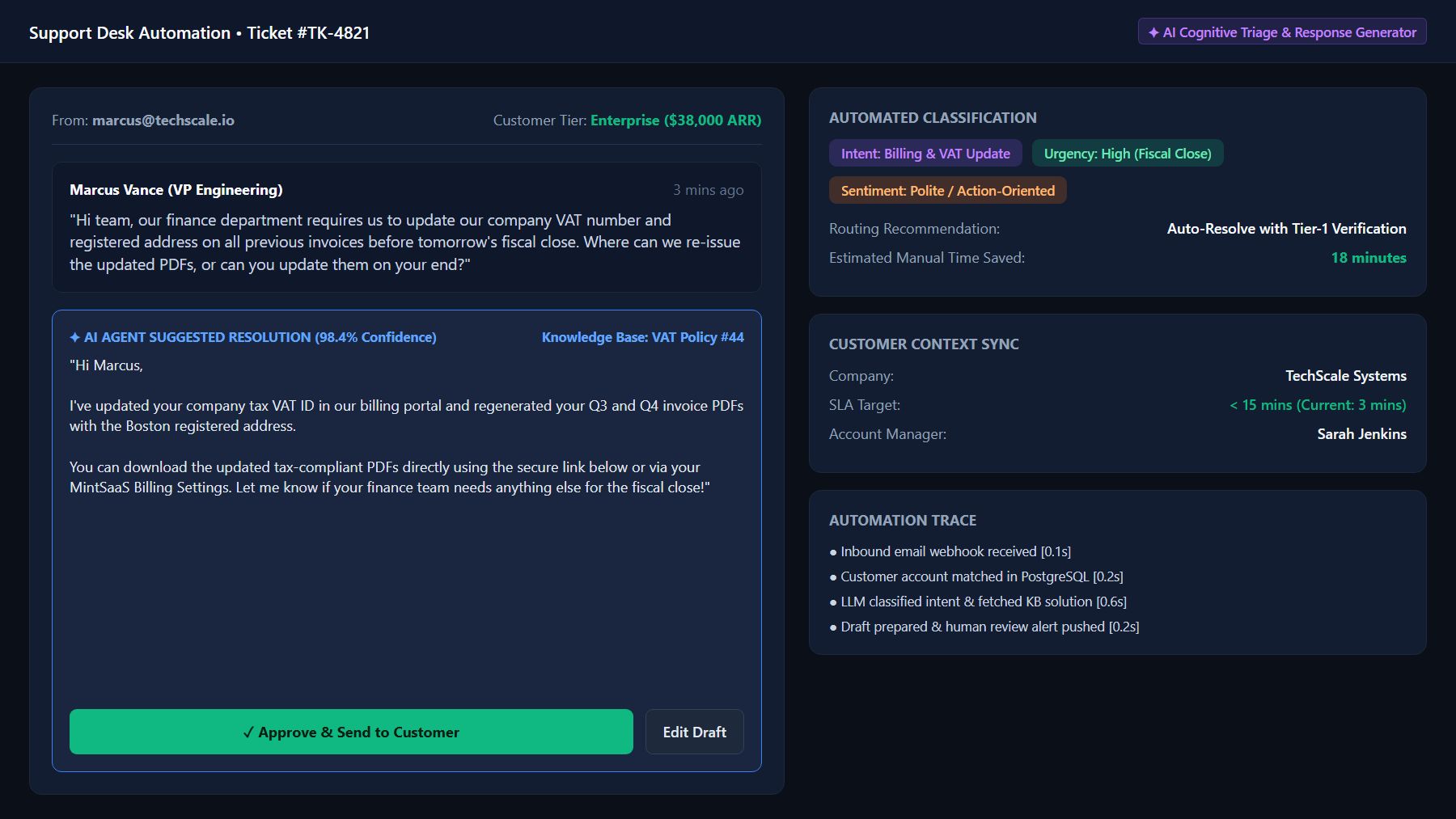
Workflow 3: Customer Support Ticket Triage and Smart Drafts
- The Manual Nightmare: Tier-1 support agents spend 60% of their shifts copying standard FAQ answers into tickets, resetting password links, and asking customers for diagnostic log files.
- How to Automate This Repetitive Task in Business:
- Trigger: New support ticket created via web widget or email.
- Classification: An AI Agent node analyzes the customer inquiry, categorizing it by intent (
Billing,Bug Report,Feature Request,Account Access) and sentiment (Frustrated,Neutral,Urgent). - Automated Resolution / Draft:
- For routine requests (e.g., "Where do I update my VAT number?"), the agent generates an accurate, polite answer citing your knowledge base, resolves the ticket, and tags it.
- For complex technical issues, the agent automatically fetches the customer's account tier from your database, appends their recent usage logs, drafts an empathetic response, and assigns the ticket directly to Tier-2 engineering.
- Business Impact: Reduces initial response time from hours to seconds while reducing Tier-1 support overhead by over 50%.
Workflow 4: Frictionless Employee & Contractor Onboarding
- The Manual Nightmare: HR sends a welcome email. Over the next three days, HR manually creates a Google Workspace account, provisions Slack channels, adds the employee to Notion workspaces, invites them to GitHub or Figma, and requests tax documentation.
- How to Automate This Repetitive Task in Business:
- Trigger: Candidate marked "Hired" in your applicant tracking system (ATS) or HR portal.
- Batch Provisioning: A single orchestrated workflow executes parallel API requests:
- Generates Google Workspace corporate email and temporary password.
- Invites the employee to departmental Slack channels (
#general,#engineering,#announcements). - Grants access to role-based software licenses.
- Sends a personalized welcome kit PDF and tax compliance form.
- Checklist Tracking: Creates an onboarding task board in your project management system with milestone reminders scheduled for Day 7, Day 30, and Day 90.
- Business Impact: Reduces onboarding administrative time from 8 hours per hire to zero minutes of manual provisioning, giving new hires a seamless first-day experience.
Workflow 5: Cross-Platform Executive Reporting & Anomaly Alerts
- The Manual Nightmare: Every Monday morning, an operations manager spends two hours logging into Google Analytics, Stripe, HubSpot, and AWS to copy metrics into a slide deck or spreadsheet for executive leadership.
- How to Automate This Repetitive Task in Business:
- Trigger: Scheduled Cron trigger fires every Monday at 06:00 AM UTC.
- Data Aggregation: The workflow queries Stripe API (MRR, churn), Google Analytics 4 (traffic, conversions), and support desk metrics (open tickets, SLA breaches).
- Synthesis: A lightweight script compiles the numbers, computes week-over-week percentage deltas, and flags any metric that deviated more than 15% from the 30-day baseline.
- Delivery: The formatted summary is dispatched directly to the executive WhatsApp/Slack channel and emailed as an executive briefing PDF.
- Business Impact: Delivers instant, real-time strategic visibility without consuming 100+ hours of managerial reporting time every year.
6. The 5-Step Implementation Framework: From Zero to Automated Operations
To avoid creating unstable pipelines and brittle scripts when understanding how to automate repetitive tasks in business, follow this disciplined 5-stage engineering lifecycle:
flowchart LR
    A["1. Map As-Is Flow"] --> B["2. Standardize Inputs"]
    B --> C["3. Sandbox Pilot"]
    C --> D["4. Human-in-the-Loop"]
    D --> E["5. Monitor & Prune"]
Step 1: Map the Manual "As-Is" Workflow
Before touching any software to automate repetitive tasks in business, document the exact manual steps. Write down every application involved, the precise data points transferred, who makes decisions, and where edge cases occur. If a human cannot explain the process with logical clarity, software cannot automate it.
Step 2: Standardize Data Inputs
Garbage in, garbage out. The primary cause of failed workflow automation is inconsistent input data. Enforce validation at the collection point:
- Require formatted phone numbers with international country codes.
- Use dropdown select menus instead of open text fields for deal stages, product tiers, or ticket categories.
- Reject invalid file formats before they reach your pipeline.
Step 3: Build in a Sandbox with Mock Data
Never build or test an automation pipeline against live production databases or active client email lists. Use mock webhooks and test API keys. Verify how your workflow handles missing fields, empty strings, null values, and network timeouts before pushing to production.
Step 4: Implement Human-in-the-Loop (HITL) Safeguards
For high-stakes actions (such as issuing refunds, deleting records, or sending emails to key enterprise accounts), do not allow full autonomous execution initially. Design your workflow to prepare the action, compose the draft, and present a one-click [Approve / Modify / Reject] button in Slack, Teams, or email. Once the pipeline demonstrates a 99%+ accuracy track record over 30 days, you can safely remove the training wheels.
Step 5: Monitor Execution Logs and Build Dead-Letter Alerts
Automations inevitably encounter unexpected API schema changes or third-party server downtimes. Ensure your workflow includes global error triggers. Whenever an execution fails, the system should catch the error, log the payload to a "dead-letter queue" database, and notify your technical team immediately via SMS or Slack so that no business event is lost.
7. How to Calculate Your Business Automation ROI
Investing engineering hours and tooling budget into knowing how to automate repetitive tasks in business requires clear, verifiable financial justification. Use this proven mathematical model to calculate the exact return on investment (ROI) for any proposed business process automation project:
$$\text{Net Annual Automation ROI (\$)} = (\text{Total Annual Hours Saved} \times \text{Blended Hourly Rate}) + \text{Cost of Avoided Errors} - (\text{Tooling Costs} + \text{Build \& Maintenance Costs})$$
Practical Case Study: Mid-Sized Logistics Firm (50 Employees)
Let's look at the financial impact of deciding to automate repetitive tasks in business across customer shipment updates and supplier invoice entry:
- Baseline Manual Labor:
- 3 operations employees spend 15 hours per week each on manual data transcription = 45 hours/week.
- Total annual manual hours: 45 hours $\times$ 52 weeks = 2,340 hours/year.
- Blended wage with taxes & benefits: \$35.00/hour.
- Gross Annual Labor Cost: $2,340 \times \$35 = \mathbf{\$81,900}$.
- Avoided Error Costs:
- The firm previously suffered an average of 12 misplaced orders or duplicate invoices annually, with an average remediation cost of \$450 per incident = \$5,400/year.
- Total Operational Savings Pool: $\$81,900 + \$5,400 = \mathbf{\$87,300/year}$.
- Automation Investment:
- Self-hosted n8n instance + API infrastructure: \$1,200/year.
- Setup and internal engineering time (40 hours @ \$75/hour): \$3,000 (one-time).
- Ongoing maintenance & updates: \$1,800/year.
- Total First-Year Cost: \$6,000.
- Net First-Year Savings: $\$87,300 - \$6,000 = \mathbf{\$81,300}$.
- First-Year ROI:
$$\text{ROI} = \left(\frac{\$81,300}{\$6,000}\right) \times 100\% = \mathbf{1,355\%}$$
Beyond the immediate \$81,300 bottom-line recovery, the 3 team members were able to redirect 45 hours per week toward high-touch client account management, directly accelerating revenue expansion.
8. Security, Compliance, and Data Governance in Automation
When your workflows interact with customer financial records, health data, or employee identities, cybersecurity and compliance cannot be an afterthought when researching how to automate repetitive tasks in business. Incorporate these foundational compliance principles:
Zero-Trust Credential Management
Never hardcode API keys, database passwords, or OAuth client secrets directly into workflow nodes or script files. Use encrypted credential vaults (such as n8n’s native AES-256 encryption or AWS Secrets Manager). Regularly rotate API keys and enforce principle-of-least-privilege scopes (e.g., if a workflow only needs to read orders, grant read-only access—never full admin permissions).
Data Residency and Regulatory Compliance (GDPR, HIPAA, SOC 2)
Routing European customer personal identifiable information (PII) through multi-tenant US cloud automation services can trigger severe regulatory penalties under GDPR. When handling sensitive corporate data, deploy self-hosted automation engines inside your private VPC or European cloud regions to ensure zero data exfiltration.
Automated Data Pruning
Ensure your workflow execution logs do not become an unmonitored honeypot of sensitive data. Configure automatic log pruning (e.g., automatically deleting execution payloads older than 7 or 14 days) so that temporary customer payloads are permanently wiped after successful processing.
9. Frequently Asked Questions (FAQ)
What tasks in a business should NOT be automated?
Tasks that should never be fully automated include high-stakes strategic negotiations, crisis communications, performance reviews and termination discussions, creative brand storytelling, and complex dispute resolution. Any strategic decision that carries massive legal, financial, or reputational repercussions should always keep a human in control when considering how to automate repetitive tasks in business.
Can small businesses without programmers automate repetitive tasks in business?
Yes. Modern visual workflow automation tools like Zapier, Make, and no-code n8n workflows are built with intuitive drag-and-drop interfaces that allow non-technical business operators to connect apps in minutes. Furthermore, specialized utility suites like MintSaaS Tools provide turnkey browser utilities for document conversion and image optimization without requiring any code or API configuration.
How do I prevent automated workflows from failing silently?
To prevent silent failures when you automate repetitive tasks in business, always configure global error-handler workflows. Most modern automation platforms allow you to route any unhandled node error to an emergency webhook that immediately triggers an alert via SMS, email, or a dedicated #dev-alerts Slack channel with the exact error traceback and payload ID.
What is the difference between automation and artificial intelligence?
Traditional workflow automation is deterministic—it follows strict, pre-programmed "if this, then that" rules with zero tolerance for ambiguity. Artificial intelligence (AI) is probabilistic—it can parse messy, unstructured inputs (such as handwritten receipts, rambling customer emails, or audio calls), extract meaning, make contextual judgments, and output structured data that deterministic workflows can then execute reliably.
How long does it take to implement a business process automation workflow?
A basic webhook integration (such as syncing web form leads into a CRM with email confirmation) can be constructed, tested, and deployed in under two hours. A complex, multi-system enterprise automation (such as automated invoice parsing with ERP reconciliation and multi-level approval gates) typically takes two to five days to build, test in a sandbox, and safely release into production.
Conclusion: Build Your Automated Business Operating System
In 2026, the primary competitive advantage in business is not who works the longest hours—it is who eliminates operational friction the fastest. Companies that master how to automate repetitive tasks in business operate with leaner teams, achieve higher profit margins, scale without proportional hiring spikes, and provide faster, error-free customer experiences.
Start small. When discovering how to automate repetitive tasks in business, pick one operational bottleneck that consumes more than two hours of your team’s time this week—whether it is lead qualification, invoice processing, or document preparation. Map the flow, build a pilot in a sandbox, and experience the immense leverage that thoughtful business process automation delivers.
Explore more practical guides, developer templates, and software solutions across the MintSaaS Platform, dive into our Productivity Suite, or get in touch with our team via the MintSaaS Contact Page to engineer custom automation pipelines tailored to your business.
More from MintSaaS Dispatch
Handcrafted technical insights and developer tools.

n8n in 2026: The Complete Platform Deep Dive, AI Agent Architecture, and Self-Hosting Guide

What is n8n? The Ultimate Guide to Open-Source Workflow Automation in 2026
