Crop PNG Image Online: The Complete Guide to Lossless, Transparent Cropping in 2026
Learn how to crop PNG images online without losing transparent backgrounds or image quality. Zero uploads, custom aspect ratios, and instant client-side precision.

Crop PNG Image Online: The Complete Guide to Lossless, Transparent Cropping in 2026
Quick Answer (AEO Direct Answer): To crop png image online without losing transparent backgrounds or image quality, use a modern client-side tool like MintSaaS Crop Image Online. Unlike legacy cloud converters that flatten 32-bit RGBA files into 24-bit RGB (turning transparent padding into ugly black or white boxes), MintSaaS uses the browser's native HTML5 Canvas 2D engine to execute a mathematical sub-rectangle slice. This preserves 100% of the alpha channel transparency, prevents lossy re-compression, and guarantees zero server uploads for total data privacy.
Portable Network Graphics (PNG) is the backbone format of the modern web. From brand logos and UI iconography to e-commerce product cutouts, digital stickers, and software screenshots, PNG’s ability to render crisp lines and full 8-bit alpha channel transparency makes it irreplaceable for web developers and designers.
However, one of the most frustrating hurdles creators encounter is finding a clean, reliable way to crop png image online. All too often, users upload a sleek, transparent logo to a random online converter only to download a ruined file: the transparent background has been replaced with a solid black or stark white rectangle, fine drop shadows have banded into jagged artifacts, or the platform slaps an intrusive watermark over their design.
Furthermore, with digital assets frequently containing unreleased branding, proprietary application mockups, or sensitive client data, uploading high-resolution graphics to ad-supported cloud servers creates severe intellectual property and compliance vulnerabilities.
In this comprehensive technical guide, we explore the underlying computer graphics architecture of PNG cropping, compare naive cloud conversion against client-side Canvas sub-matrix slicing, explain how to crop to exact aspect ratios without raster distortion, and demonstrate how to use a 100% free, zero-upload tool to crop png image online losslessly.
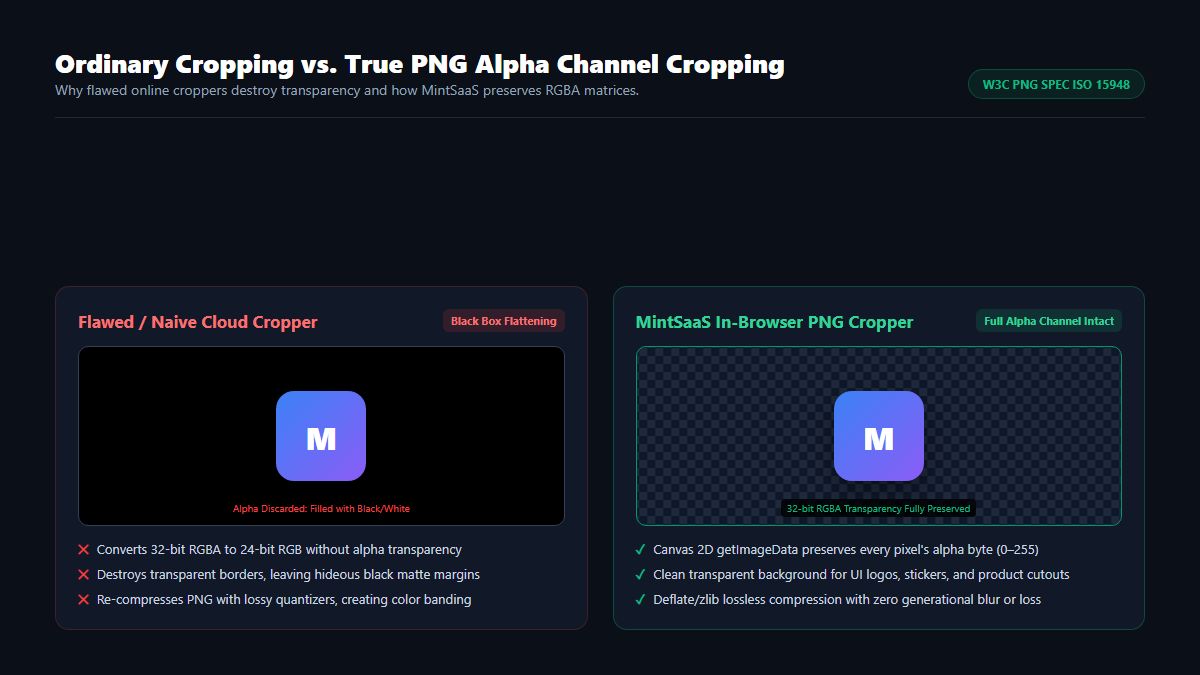
1. What Happens When You Crop PNG Image Online? The Mechanics of Transparency
When designers and creators decide to crop png image online, they often assume all image cropping algorithms work identically. However, to understand why ordinary photo croppers ruin transparent graphics, it is essential to look at the structural difference between standard photographic formats (like JPEG) and the W3C Portable Network Graphics (PNG) Specification.
The RGBA Color Model and the Alpha Channel
Most standard images rely on three color channels: Red, Green, and Blue (RGB), utilizing 8 bits per channel (24 bits total). Each pixel represents a color mixture ranging from (0, 0, 0) (pure black) to (255, 255, 255) (pure white).
PNG images, specifically PNG-32 and PNG-64, incorporate a critical fourth channel: the Alpha Channel (A). In an RGBA pixel:
- An alpha value of
255represents 100% opacity. - An alpha value of
0represents 100% transparency. - Intermediate values between
1and254represent semi-transparency (essential for anti-aliased curved edges, translucent glass effects, and soft drop shadows).
% 32-bit RGBA Pixel Representation
Pixel Data: [R: 16, G: 185, B: 129, A: 0]   % Fully Transparent Green
Pixel Data: [R: 16, G: 185, B: 129, A: 128] % 50% Translucent Mint
Pixel Data: [R: 16, G: 185, B: 129, A: 255] % 100% Opaque Solid
When you seek to crop png image online, the software must extract a sub-rectangle of pixels while keeping the precise RGBA 4-byte values completely intact for every remaining coordinate.
Why Do Legacy Tools Turn Transparency into Black or White?
Many basic online photo tools were engineered primarily for JPEG photography. When you upload a PNG to a legacy server-side converter:
- The server loads the image into a backend graphics library that defaults to 24-bit RGB.
- Because 24-bit RGB has no mathematical concept of an alpha channel, the engine fills any pixel where
Alpha = 0with a default matte fill color—typically#000000(black) or#FFFFFF(white). - The server then re-compresses the image, permanently baking that black or white bounding box into your logo.
- When you place that cropped file over a dark website header or colored banner, the hideous square border destroys your design.
To avoid this disaster, you must use a dedicated utility designed specifically to crop transparent png online with native alpha channel awareness.
2. Under the Hood: How a Modern In-Browser PNG Cropper Works
A next-generation tool like the MintSaaS Crop Image Studio does not rely on distant cloud servers. Instead, it leverages modern WHATWG HTML5 Canvas 2D APIs directly within your device’s browser sandbox.
Here is the exact mathematical sequence that occurs when you crop png image online using client-side technology:
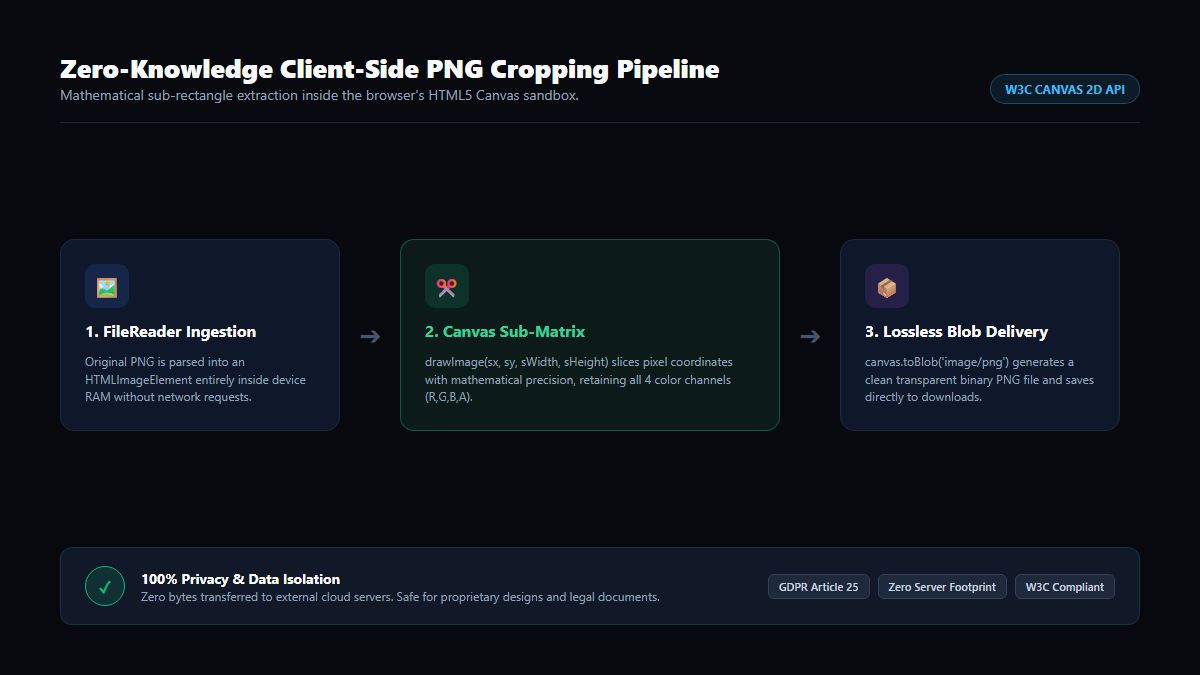
Step 1: Memory Ingestion via FileReader
When you drop your file into the browser, the file is read locally using the browser's asynchronous FileReader API. The binary stream is decoded into an uncompressed HTMLImageElement stored exclusively in your local device RAM. Not a single packet travels over the network.
Step 2: Coordinate Mapping & Aspect Ratio Constraints
As you drag the visual crop box across the canvas, the application tracks four spatial variables:
- $s_x$: Source X starting coordinate
- $s_y$: Source Y starting coordinate
- $s_w$: Source sub-rectangle width
- $s_h$: Source sub-rectangle height
If you lock an aspect ratio preset (such as 1:1 for profile pictures, 16:9 for YouTube thumbnails, or 4:3 for standard presentations), the UI constrains the relationship between $s_w$ and $s_h$ mathematically, preventing accidental aspect distortion.
Step 3: Sandboxed Sub-Matrix Extraction
When you click Crop, the engine instantiates an off-screen <canvas> element initialized exactly to the dimensions of the crop box ($s_w \times s_h$).
The engine executes the native Canvas drawImage method using the 9-parameter coordinate mapping:
$$\text{ctx.drawImage}(\text{image}, s_x, s_y, s_w, s_h, 0, 0, s_w, s_h)$$
This operation performs a raw memory copy of the selected pixel matrix. Because the off-screen canvas is initialized without a background color, all transparent pixels ($A = 0$) retain their full transparency without color contamination.
Step 4: Lossless PNG Blob Encoding
Finally, the canvas calls canvas.toBlob(callback, 'image/png'). The browser’s internal graphics compositor compiles the raw RGBA pixel buffer into an authentic RFC 2083 standard PNG file using lossless Deflate/zlib compression. The finished binary is passed directly to your browser's download manager.
This represents the gold standard when you crop png image online: zero generational blur, zero lossy artifacts, and 100% alpha transparency preservation.
3. Comparison: Naive Cloud Croppers vs. MintSaaS Client-Side Cropping
To help digital artists, web developers, and marketing professionals make informed decisions, examine the architectural comparison below:
| Architectural Metric | Typical Ad-Supported Cloud Cropper | Desktop Graphics Suite (Photoshop / GIMP) | MintSaaS In-Browser PNG Cropper |
|---|---|---|---|
| Alpha Transparency | Often flattened to black/white | Preserved (Requires manual export setup) | 100% Preserved Automatically |
| Processing Location | Remote Third-Party Server | Local CPU/GPU | Local Browser Sandbox (WASM/Canvas) |
| Data Privacy & Security | High Risk (File uploaded to cloud) | 100% Secure (Offline) | Zero-Upload (Zero Trust Compliant) |
| Processing Speed | Slow (Upload + Queue + Download) | Instant (Once software boots) | Near-Instant (Zero Network Latency) |
| Software Footprint | None (Web-based) | Heavy (2 GB to 4 GB installation) | Zero Installation (Pure Web Standard) |
| Cost & Paywalls | Freemium / Watermarks / Ads | Paid subscription (\$240–\$600/year) | 100% Free Forever |
| Aspect Ratio Presets | Limited or clunky | Fully customizable | 1:1, 16:9, 16:10, 4:3, 9:16 & Freeform |
4. Top Real-World Use Cases to Crop PNG Image Online
Being able to crop png image online quickly and cleanly streamlines workflows across several technical and creative fields:
1. Removing Excess Transparent Padding from Logos
Graphic designers often export vector SVGs to PNG with huge transparent canvas margins (e.g., an 800×200 logo centered inside a 2000×2000 transparent square). When embedded into a website navbar or email footer, this excess transparent padding throws off CSS flexbox alignments and causes unwanted whitespace. Using an in-browser tool to crop png online trims the canvas tight against the visible artwork without damaging the transparent background.
2. Creating Pixel-Perfect Favicons & App Icons
Browser favicons and mobile app icons require exact 1:1 square aspect ratios (e.g., 32×32, 192×192, 512×512). If an original logo is rectangular, forcing it into a square container squeezes and distorts the typography. By using the 1:1 preset to crop png image online, you isolate the core emblem or monogram with perfect geometric symmetry.
3. E-Commerce Product Photography Cataloging
Online merchants selling apparel, electronics, or handmade crafts on Shopify, Etsy, or Amazon frequently remove image backgrounds using background removal tools. Once the background is removed, using a tool to crop transparent png online tightens the framing around the product, ensuring uniform visual hierarchy across catalog grids.
4. Software Documentation & Bug Reporting
When taking screenshots of web applications, you rarely need the entire browser window with bookmarks and personal tabs. Cropping the image to highlight only the relevant modal or button speeds up comprehension for team members and external clients. To further protect sensitive credentials before publishing, pair this with our Blur Image Online Studio or explore our Photobucket Blur Guide.
5. Social Media Banners & Story Graphics
Every major digital platform enforces strict aspect ratios:
- YouTube Thumbnails & Twitter Banners: 16:9 Widescreen
- Instagram Feeds: 1:1 Square or 4:5 Portrait
- TikTok & Instagram Stories / Reels: 9:16 Vertical
- MacBook & Laptop Wallpapers: 16:10 Widescreen
Using an online crop png utility with pre-calibrated ratio locks ensures your graphics never get cropped awkwardly by automated platform algorithms.
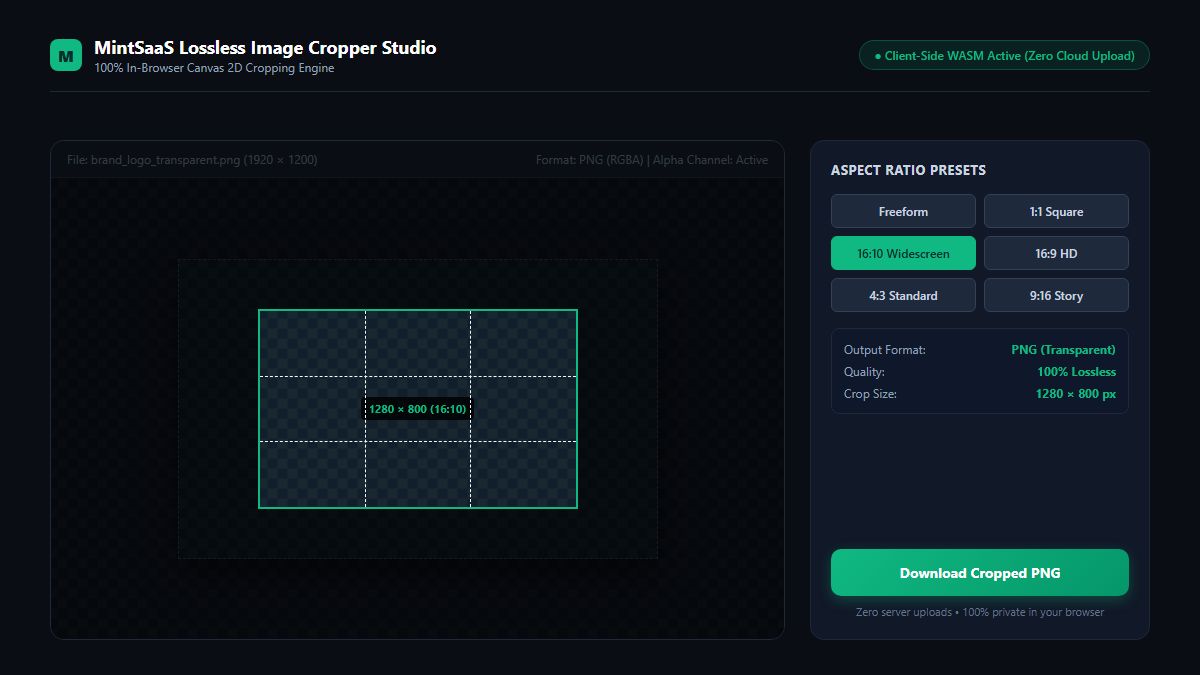
5. Step-by-Step Tutorial: How to Crop PNG Image Online on MintSaaS
Here is how you can crop png image online with flawless, publication-ready precision in four simple steps:
Step 1: Open the Tool to Crop PNG Image Online
Navigate to the MintSaaS Crop Image Online Studio in any modern browser (Chrome, Edge, Safari, Firefox, Brave).
Step 2: Ingest the Graphic You Want to Crop PNG Image Online
Drag and drop your file into the upload zone or click to select from your device. Because processing is handled client-side, even massive 30 MB multi-megapixel PNG files render on the canvas instantaneously.
Step 3: Select Your Aspect Ratio & Adjust the Bounding Box
- Freeform Mode: Drag the corner handles to freely frame any custom rectangular region.
- Ratio Presets: Click 1:1 Square, 16:9 HD, 16:10 Widescreen, 4:3 Standard, or 9:16 Story to lock your crop boundary into exact geometric proportions.
- Reposition: Click and drag the interior of the crop box to center the subject within the composition.
Step 4: Download and Export Your Cropped PNG Image Online
Verify that the output format is set to PNG (Transparent) and click Download Cropped Image. Your browser immediately saves the clean, cropped graphic directly to your downloads directory.
Need to rotate or compress your file next? Seamlessly pass your assets through our Online Image Rotator or optimize your documents with our PDF Toolkit.
6. Security & Privacy: Why You Should Never Upload Confidential PNGs to Ad-Filled Sites
Many users searching for a quick way to crop png image online click the top sponsored link on Google without considering the privacy risks of centralized web converters.
The Dangers of Centralized File Uploads
- Third-Party Data Retention: Commercial converters often store uploaded images on multi-tenant cloud servers (such as public Amazon S3 buckets) where files may remain accessible via public hashes for hours or days.
- Metadata Harvesting: Unvetted tools read embedded EXIF and XMP metadata, including GPS coordinates, camera serial numbers, and creator copyright information.
- Intellectual Property Leaks: Proprietary UI wireframes, unreleased product renderings, and confidential client mockups uploaded to unvetted cloud services can be indexed by web scrapers or exposed in server misconfigurations.
The MintSaaS Zero-Knowledge Guarantee
MintSaaS operates under a strict Zero-Knowledge Architecture:
- 100% Local Execution: All image slicing, canvas operations, and file exports are executed inside your browser’s V8/JavaScript engine.
- Zero Server Transmission: Zero bytes of your image data are transmitted to our servers or any third-party analytics APIs.
- Offline Capable: You can open the MintSaaS Crop Image Tool, turn off your Wi-Fi, and crop your PNG completely offline.
This client-side architecture complies fully with GDPR Article 25 (Privacy by Design and by Default) and modern enterprise data isolation policies.
7. Common Pitfalls to Avoid When Cropping PNG Images Online
To maintain crisp graphics and prevent visual degradation, avoid these common mistakes when you crop png image online:
- Accidentally Exporting as JPEG: Never select JPEG as your output format if your image contains a transparent background. JPEG does not support alpha channels and will forcibly replace transparent pixels with solid white. Always export as PNG.
- Cropping Too Closely to Drop Shadows: Soft drop shadows often extend 15 to 30 pixels beyond the visible boundary of an icon. If you position your crop boundary directly against the solid edge of the artwork, you will truncate the shadow, creating a harsh, unnatural line.
- Repeated Lossy Compression: While PNG is inherently lossless, running a PNG through aggressive lossy quantizers repeatedly causes subtle color banding. Use a pure canvas cropper that preserves original RGBA color palettes without re-quantization.
- Ignoring Sub-Pixel Antialiasing: When resizing or scaling during a crop, ensure your software uses bicubic or high-quality bilinear interpolation to prevent text and thin lines from appearing jagged.
- Failing to Automate Repetitive Image Tasks: If your team regularly crops hundreds of assets for catalog management, manual clicking wastes dozens of hours. Discover how to streamline image pipelines in our master guide on how to automate repetitive tasks in business.
8. Frequently Asked Questions (FAQ)
Can I crop a PNG image online without losing its transparent background?
Yes. When you use the MintSaaS Crop Image Online studio, the tool operates directly on the 32-bit RGBA pixel buffer inside your browser. All transparent pixels ($A = 0$) and semi-translucent pixels are preserved with 100% fidelity, ensuring your cropped logo or graphic stays completely transparent.
Does cropping a PNG reduce its image quality?
No. Cropping is simply the extraction of a sub-rectangle of pixels from the original canvas. Because our client-side cropper does not downscale or resample the remaining pixels, the cropped region retains 100% of its original resolution, sharpness, and color accuracy.
Is the MintSaaS online PNG cropper free to use?
Yes, it is 100% free with no limits. There are no file size restrictions, no daily quotas, no watermarks added to your images, and no account registration or email subscription required.
Can I crop a PNG image to a specific aspect ratio like 1:1 or 16:9?
Yes. Our online cropper features pre-calibrated aspect ratio locks, including 1:1 (Square/Favicon), 16:9 (HD Widescreen), 16:10 (Laptop/Desktop), 4:3 (Standard Photo), and 9:16 (Vertical Story), as well as a flexible Freeform mode.
Are my private images safe when I crop them on MintSaaS?
Yes, absolutely. MintSaaS operates 100% client-side via HTML5 Canvas and WebAssembly. Your photos and graphics never leave your computer or phone. Zero bytes of file data are ever transmitted to our servers, making our tools compliant with GDPR, HIPAA, and corporate security standards.
How do I crop a circular avatar from a PNG?
To create a circular avatar, first crop your PNG into a 1:1 square aspect ratio using our online cropper to center the subject. Once cropped as a 1:1 square, modern web browsers and social media platforms automatically render the image as a circle using CSS (border-radius: 50%) while keeping the transparent corners invisible.
What is the difference between cropping and resizing a PNG?
- Cropping: Slices away outer portions of the canvas to change the framing, composition, or aspect ratio while leaving the remaining pixels at their original scale.
- Resizing: Scales the entire image up or down, altering its total pixel dimensions without cutting away any visual content.
Conclusion: Achieve Pixel-Perfect, Transparent PNG Cropping Today
Whether you are fine-tuning a brand logo for a corporate website, prepping an e-commerce catalog, or crafting high-converting social media thumbnails, you should never have to compromise between precision cropping and alpha transparency.
Stop settling for clunky converters that ruin your transparent backgrounds with black boxes or risk your private data on untrusted cloud servers. Experience the speed, precision, and complete privacy of client-side image editing.
Visit the MintSaaS Crop Image Online Studio today, or explore our complete suite of free utilities in the Productivity Category to elevate your digital creative workflow.
More from MintSaaS Dispatch
Handcrafted technical insights and developer tools.

Convert HEIC to JPG: The Ultimate Guide to Converting iPhone Photos Online in 2026

Convert WebP File: The Definitive Guide to Converting WebP Images to JPG & PNG Online in 2026
