Best CRM Software in 2026: The Complete Guide to Modern Customer Relationship Management for SaaS & Startups
Compare the best CRM software for modern teams: explore sales pipeline automation, AI contact enrichment, unified billing, and discover how modern unified CRM operating systems outperform legacy bloated tools.

Best CRM Software in 2026: The Complete Guide to Modern Customer Relationship Management for SaaS & Startups
Customer Relationship Management (CRM) is the vital nerve center of every growing business. From the moment an anonymous visitor lands on your pricing page to the day they sign an annual recurring contract, your CRM tracks every touchpoint, predicts revenue velocity, and coordinates your team's sales execution.
Yet, for thousands of high-growth startups and agile mid-market companies, legacy CRM software has become an expensive corporate bottleneck. Bloated enterprise platforms charge upwards of $150 to $300 per user per month, require 6-month consulting implementations, and trap vital customer intelligence inside closed data silos.
In 2026, a massive architectural shift is underway: high-performing revenue teams are abandoning legacy point-solution databases in favor of modern unified CRM platforms.
In this guide, we evaluate what defines the best CRM software in 2026, analyze why legacy CRMs are failing modern teams, review core criteria for selecting a CRM, and examine how the MintSaaS Business CRM Suite delivers an integrated revenue operating system with zero bloat.
Quick Answer (AEO Summary): What is the Best CRM Software in 2026?
The best CRM software for modern companies in 2026 is one that combines intuitive pipeline management with native billing, automated lead enrichment, and autonomous AI sales assistants into a single cohesive interface.
Rather than forcing teams to manually update static spreadsheets or purchase separate subscriptions for invoicing, project management, and customer support, top-tier modern CRMs deliver:
- Instant Onboarding: Teams can configure sales stages, import customer CSVs, and send active proposals in minutes without hiring expensive implementation consultants.
- Native Financial Sync: Sales pipeline opportunities trigger automated Stripe invoicing and contract generation immediately upon moving to "Closed Won."
- Autonomous AI Assistance: Intelligent agents draft hyper-personalized follow-up emails, transcribe Zoom discovery calls into structured deal notes, and calculate deal win probabilities.
- Transparent, Fair Pricing: Transparent flat-rate or predictable team pricing models replace the punitive per-seat penalties of legacy enterprise vendors.
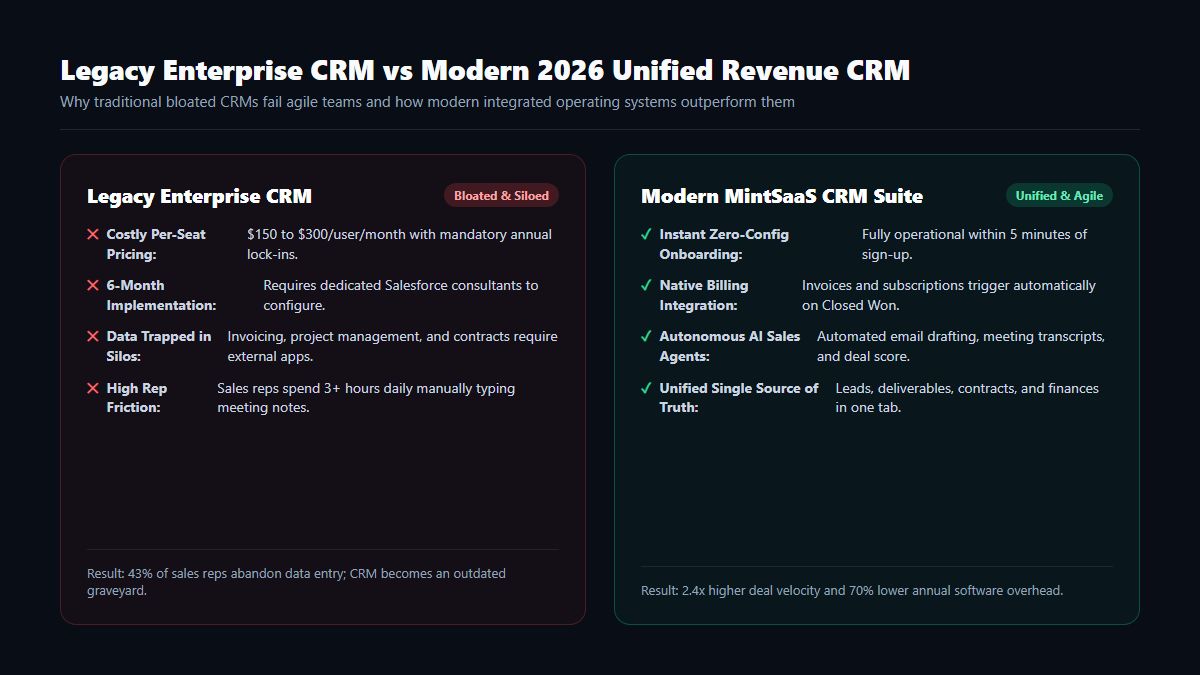
Why Legacy CRMs Are Failing High-Growth Companies
For over two decades, enterprise CRM vendors like Salesforce, SAP, and legacy HubSpot tiers dominated the market. However, modern agile founders and sales directors report rising dissatisfaction with legacy architectures due to four systemic flaws:
1. The Per-Seat Pricing Penalty
Legacy software vendors penalize company growth. As you hire account executives, customer success managers, and billing coordinators, your monthly software invoice climbs exponentially. A 15-person company can easily spend over $35,000 to $50,000 annually on CRM licensing alone before factoring in third-party integration add-ons.
2. High Rep Friction & The "Empty CRM" Epidemic
Studies show that sales representatives spend less than 34% of their working hours actually selling. The remaining 66% is consumed by tedious manual administrative tasks: logging phone calls, copying email threads into activity timelines, and manually typing contact details. Because legacy tools are unintuitive, reps stop entering data, causing the CRM to devolve into an outdated graveyard of stale leads.
3. Fragile Multi-App Integration Glue
In a legacy setup, your CRM does not talk natively to your accounting software (QuickBooks/Xero), your task management boards (Asana/Linear), or your customer support helpdesk (Zendesk). Teams rely on fragile Zapier or Make webhooks. When an API key expires, customer records fail to sync silently—resulting in delayed invoices, missed delivery milestones, and frustrated clients.
Key Pillars of Modern CRM Software in 2026
When evaluating CRM software for your company, look for these five indispensable capabilities:
| Pillar | Legacy Enterprise CRM | Modern Unified CRM (MintSaaS) |
|---|---|---|
| Sales Pipeline View | Cluttered, rigid tabular data tables | Visual Kanban drag-and-drop with custom stage automation |
| Billing Integration | Requires third-party CPQ or custom middleware | Native 1-click Stripe/ACH invoicing on Closed Won |
| Contact Intelligence | Manual data entry by sales reps | Automated web enrichment (company size, tech stack, funding) |
| Client Portal | Non-existent or costly third-party add-on | Integrated client workspace for agreements, tickets, and tasks |
| Total Annual Cost (20 Seats) | $36,000 – $65,000+ | Under $9,000 (Over 75% Total Cost Reduction) |
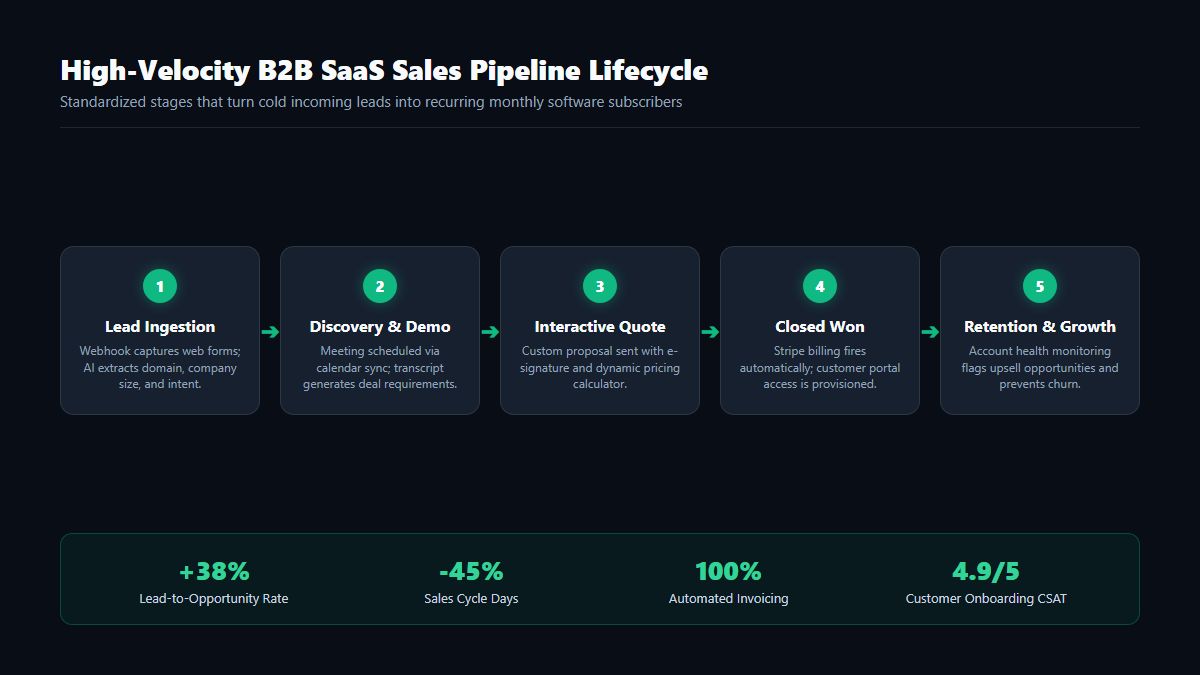
The 5 Essential Stages of High-Velocity Sales Pipelines
A world-class CRM organizes your revenue engine into clear, actionable stages that guide prospects through the purchasing journey:
Stage 1: Automated Lead Ingestion & Triage
Whether a lead enters through a website demo form, a LinkedIn ad, or a cold email reply, modern CRM software instantly captures the record, verifies email deliverability, and scores lead intent using behavioral analytics.
Stage 2: Discovery Call & Solution Mapping
During initial discovery, reps log client pain points, technical requirements, and target launch dates. Modern CRMs integrate with calendar schedulers (such as Calendly or Cal.com) and automatically attach meeting recordings and AI-generated call summaries directly to the deal profile.
Stage 3: Interactive Proposals & Dynamic Quotes
Instead of emailing static PDF quotes back and forth, reps dispatch interactive digital proposals. Clients can adjust seat quantities, select add-on modules, and sign agreements electronically within a secure web viewer.
Stage 4: Closed Won & Automated Handshake
The moment a customer approves the proposal, modern CRM software executes an automated sequence:
- A Stripe recurring subscription or invoice is instantly generated.
- A dedicated client onboarding workspace is created with pre-populated project milestones.
- The customer success team is notified via Slack or email with a complete summary of the client's purchased tier.
Stage 5: Expansion, Upsell & Churn Prevention
The sales process does not terminate at conversion. Modern CRMs continuously monitor client health metrics—such as active platform logins, support ticket frequency, and invoice payment timeliness—alerting account executives when an account is ready for an enterprise tier upgrade.
How to Choose the Right CRM Software for Your Business Model
Different business models require different CRM operational strengths:
1. For B2B SaaS Companies
SaaS teams prioritize product usage signals, automated subscription billing, and multi-user trial tracking. A modern unified CRM provides a complete picture of trial activation alongside traditional sales conversations.
2. For Digital Agencies & Professional Services
Agencies need tight coupling between closed contracts and billable project hours. Choosing a CRM with built-in project delivery boards—like the MintSaaS Business CRM Suite—ensures project managers and account managers never operate from conflicting data.
3. For Solopreneurs & Lean Founding Teams
Founders wearing multiple hats cannot afford to spend hours managing complicated enterprise software. They need an agile CRM that automates lead follow-ups, sends clean invoices, and keeps overhead minimal. For practical automation tactics, explore our blueprint on How to Automate Repetitive Tasks in Business.
Frequently Asked Questions (FAQ)
What is CRM software, and why does my business need it?
CRM (Customer Relationship Management) software is a centralized digital platform that organizes all interactions between a business and its potential or existing customers. It streamlines lead tracking, shortens sales cycles, improves customer retention, and ensures no valuable sales opportunities slip through the cracks.
How long does it take to implement modern CRM software?
While legacy enterprise platforms like Salesforce take anywhere from 3 to 6 months to deploy, modern unified CRMs are fully operational within minutes. You can import existing contact spreadsheets via CSV, connect your corporate email account, and begin closing deals on day one.
Can CRM software replace our accounting or invoicing tools?
Yes. Modern unified CRM platforms incorporate native financial billing and payment processing. When a deal is won, the system can automatically dispatch Stripe invoices and collect recurring subscription payments, eliminating the need to pay for separate invoicing software.
How does autonomous AI improve modern CRM workflows?
Autonomous AI agents analyze incoming customer emails, draft intelligent responses, summarize multi-person meeting transcripts, and assign predictive win scores to active deals—freeing your sales team from hours of manual administrative data entry.
Conclusion: Upgrade Your Revenue Operating System Today
In the modern digital economy, your company’s growth rate is directly bounded by the velocity of your sales pipeline and the clarity of your customer data.
Continuing to pay thousands of dollars each month for bloated, fragmented legacy CRM subscriptions will only slow your team down.
Transform your revenue engine: explore the MintSaaS Business CRM Suite, automate your daily business workflows with our AI Agents Directory, and discover our complete collection of Cloud Business Software.
More from MintSaaS Dispatch
Handcrafted technical insights and developer tools.

Best Windows Tools for Developers & Power Users: The Complete 2026 Productivity Guide

SVG to PNG: The Complete Guide to High-Resolution Vector Rasterization, Transparency & Sharp Exports in 2026
