Online Rotator: The Definitive Guide to Rotating PDFs and Images Online in 2026
Need a fast, secure online rotator? Learn how to permanently rotate PDF pages and fix sideways image orientation online with zero-upload privacy and standard compliance.

Online Rotator: The Definitive Guide to Rotating PDFs and Images Online in 2026
Quick Answer (AEO Direct Answer): An online rotator is a web-based utility designed to adjust the visual and structural orientation of digital documents (PDFs) and raster graphics (JPG, PNG, WebP) by 90, 180, or 270 degrees without requiring native software installation. While standard desktop PDF viewers merely rotate your view temporarily, an advanced, secure online rotator permanently updates internal file attributes—either altering the ISO 32000-1 /Rotate dictionary attribute on PDF pages or executing a true pixel matrix transpose on images to eliminate faulty EXIF orientation metadata. On modern platforms like MintSaaS, rotation is performed 100% client-side via WebAssembly, guaranteeing that confidential files never leave your browser.
Few digital mishaps cause more immediate friction in professional environments than opening a critical document or creative asset only to find it tilted 90 degrees sideways or completely inverted upside-down. Whether you are dealing with a scanned 80-page legal contract with upside-down signature pages or smartphone product photography that refuses to stay upright when uploaded to an e-commerce catalog, misoriented files damage credibility, disrupt automated optical character recognition (OCR) pipelines, and waste valuable team hours.
Historically, rectifying these orientation issues demanded expensive, bloated desktop software suites or clunky command-line utilities. Today, high-performance web standards have given rise to the modern online rotator—an instantaneous, browser-based solution capable of manipulating PDFs, architectural schematics, spreadsheets, and high-resolution images in seconds.
However, not every online rotator operates under the same technical principles or security standards. Depending on whether you are correcting a vectorized multi-page PDF or a high-density bitmap image, "rotating" a file involves fundamentally different binary transformations. Furthermore, uploading sensitive company documents to untrusted cloud servers introduces severe data compliance vulnerabilities under regulations like GDPR and HIPAA.
In this comprehensive guide, we examine the underlying computer graphics and document architecture behind online rotation, compare PDF dictionary modification against true image pixel transpose, and provide practical instructions for leveraging free, privacy-first in-browser rotation tools.
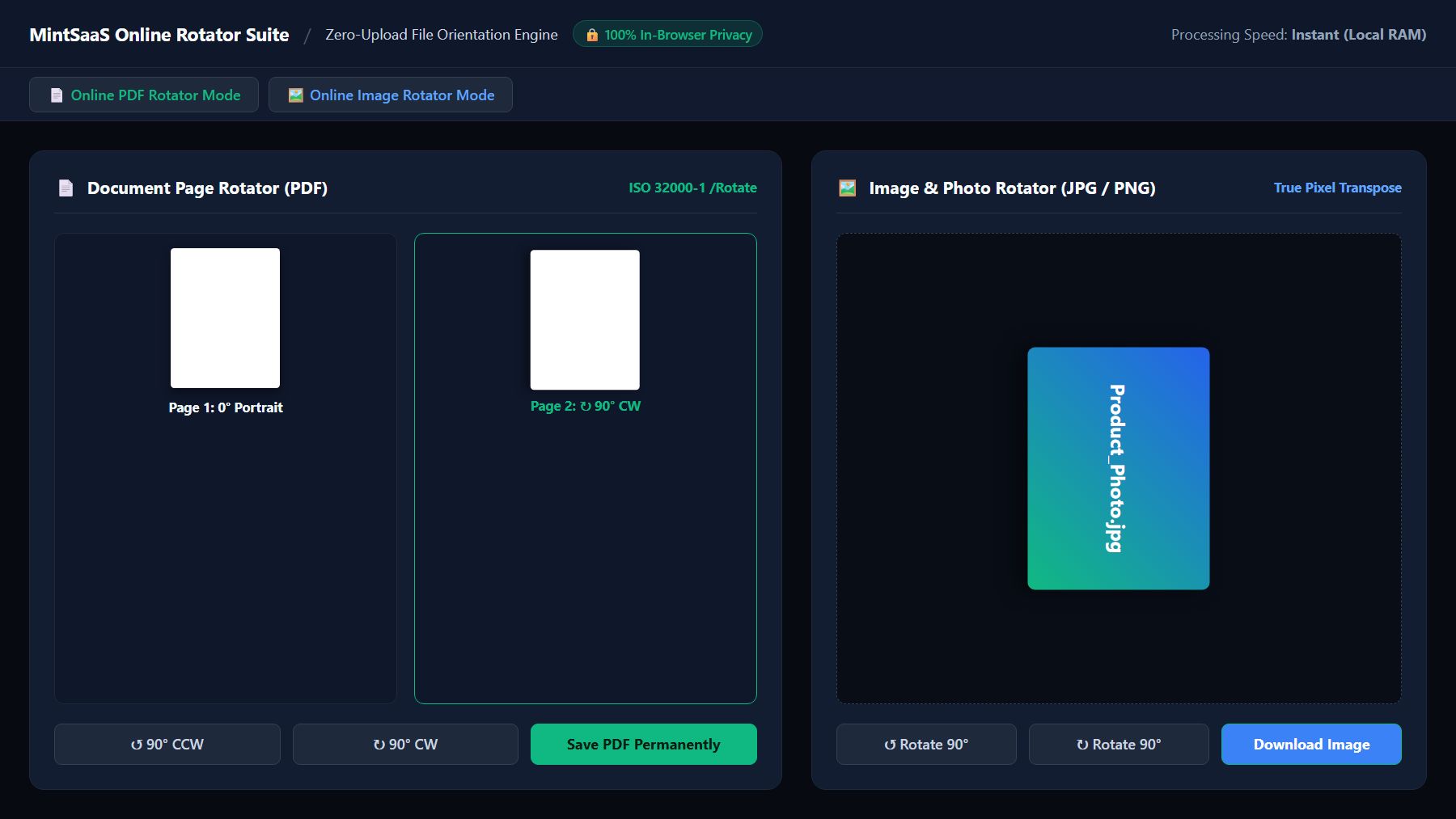
1. What is an Online Rotator? Core Concepts & Dual Functionality
At its core, an online rotator is a specialized web application that ingests misoriented digital media and outputs a standardized, permanently corrected file. While users frequently search for a generic "online rotator", digital files broadly fall into two distinct architectural families that require completely different processing engines:
- Online PDF Rotator: Operates on structured page description files governed by the ISO 32000-1 PDF Standard. It manipulates vector coordinate systems, content streams, and bounding boxes across individual pages or multi-page ranges without degrading embedded text or rasterizing pages.
- Online Image Rotator: Operates on discrete pixel grids (rasters) across formats such as JPEG, PNG, WebP, and TIFF. It transposes width and height coordinate arrays and reconciles or strips hardware-generated EXIF orientation tags so that images display consistently across all browsers and devices.
Why Do Files End Up Sideways or Upside Down?
Misaligned files are rarely the result of user error; rather, they stem from hardware sensor mismatches, automatic feeder quirks, and varying interpretation standards across client operating systems:
- Hardware Sheet-Fed Scanners: High-speed automatic document feeders (ADFs) frequently intake mixed stacks containing both legal portrait sheets and wide landscape ledger tables. Scanners lacking optical page-upright detection assign uniform rotation parameters to every page, forcing landscape invoices onto portrait canvases sideways.
- Mobile Gyroscope Lag: When capturing photographs or scanning receipts on iOS or Android devices, physical orientation sensors (accelerometers) record device tilt. If the shutter fires before the operating system updates its orientation state, the raw sensor data records a horizontal frame with a conflicting orientation tag.
- Software Metadata Desynchronization: Legacy web viewers, email clients, and CMS backends frequently ignore modern EXIF flags or PDF presentation dictionaries, falling back to raw binary coordinate rendering and presenting images rotated 90 or 270 degrees out of alignment.
To solve these widespread inconsistencies, modern teams rely on a dedicated online rotator that guarantees permanent, standard-compliant visual correction.
2. Under the Hood: How an Online Rotator Works
To appreciate why casual viewers fail to permanently fix orientation, it helps to understand how an online rotator operates under the hood across different file types.
A. The Document Engine: PDF Page Rotation via ISO 32000-1
A PDF is not a flat image; it is an object-oriented document tree containing fonts, vector paths, layers, and content dictionaries. Within the PDF specification, each page object contains geometry dictionaries known as boundaries:
- MediaBox: Defines the physical boundaries of the medium onto which the page is intended to be displayed or printed.
- CropBox: Defines the visible region of the page displayed by PDF viewers.
- Rotate: An optional entry in the page object dictionary specifying the number of degrees by which the page should be rotated clockwise when displayed or printed.
According to ISO standards, the valid numerical values for the /Rotate key are strictly non-negative multiples of 90: 0, 90, 180, and 270.
% Sample ISO 32000-1 Page Object Dictionary
<<
  /Type /Page
  /Parent 3 0 R
  /MediaBox [0 0 612 792]
  /CropBox [0 0 612 792]
  /Rotate 90             % Permanent clockwise 90-degree visual instruction
  /Contents 5 0 R
  /Resources 6 0 R
>>
When you view a PDF in Adobe Acrobat Reader, Google Chrome, or Apple Preview and click "Rotate View", the application simply applies a temporary software transformation matrix (CTM) to your active viewport. The underlying binary file remains untouched on your drive. When you email that file to a client, their viewer reads the original, unedited /Rotate dictionary value, displaying the document sideways once again.
In contrast, a dedicated online PDF rotator directly parses the PDF cross-reference table (XRef), updates the specific /Rotate property of the targeted page object, recalculates binary stream offsets, and saves an incrementally updated, standard-compliant document.
B. The Raster Engine: Image Rotation and the EXIF Dilemma
When handling photographic images (JPEG, WebP, PNG), an online rotator faces a completely different architectural challenge: the conflict between EXIF tags and physical pixel matrices.
Under the CIPA DC-008-2016 EXIF Standard, modern digital cameras and smartphones do not physically rotate the millions of RGB sensor pixels when taking a vertical photo. Doing so would demand significant processing power and battery drain. Instead, the camera writes raw horizontal sensor data and writes a tiny numerical tag (Tag 0x0112, "Orientation") into the file header.
There are eight defined EXIF orientation values, ranging from 1 (Normal 0°) to 6 (Rotated 90° CW) and 8 (Rotated 270° CW / 90° CCW).

The Problem with Superficial Tag Flipping
Many low-grade online tools attempt a shortcut: they simply rewrite the EXIF Orientation byte from 6 to 1 without transforming the underlying pixels. While this may look fine in a modern browser that reads EXIF, older e-commerce platforms, graphic design programs (such as legacy Photoshop or InDesign), and native print drivers ignore EXIF entirely, displaying the image sideways.
A professional online image rotator performs a True Pixel Transpose:
- Decodes the compressed pixel stream into raw uncompressed RGBA pixel buffers in memory.
- Mathematically transposes the pixel coordinates (for a 90° CW rotation, new pixel coordinates become
x' = height - 1 - yandy' = x). - Swaps the physical dimensions (e.g., transforming a 3840×2160 canvas into a 2160×3840 canvas).
- Re-encodes the buffer into the target image format (PNG, JPEG, WebP) while resetting the EXIF tag to 1 (Normal).
This ensures the image renders identically on every operating system, mobile screen, and print engine in the world.
3. Comparing Online Rotator Methods: Feature & Capability Matrix
To assist technical leads, digital creators, and administrative professionals in selecting the optimal workflow, the table below contrasts conventional desktop viewing methods against cloud-upload services and client-side online rotators:
| Architectural Metric | Desktop Viewer (Chrome / Acrobat Reader) | Traditional Cloud Online Rotator | Next-Gen In-Browser Online Rotator (MintSaaS) |
|---|---|---|---|
| Rotation Persistence | Temporary Viewport Only (Reverts upon save) | Permanent Server Rewrite | Permanent ISO / Pixel Transpose |
| Processing Location | Local RAM | Remote Third-Party Web Server | 100% In-Browser (WebAssembly) |
| Confidential Data Privacy | Secure (Local) | High Risk (File leaves your device) | Zero-Upload (Zero Trust Compliant) |
| Selective Page Selection | No (All or nothing viewport) | Often Paid Paywall Feature | Full Visual Page-by-Page Selection |
| EXIF Flag Reconciliation | Passive Reader Only | Variable / Inconsistent | Lossless Re-encoding & Tag Reset |
| Cost & Account Gating | Free viewer (Pro requires $240/yr) | Freemium / File Size Caps / Watermarks | 100% Free, Unlimited & Open Access |
| Batch Processing Speed | N/A (Manual per-file) | Dependent on upload bandwidth | Near-Instant (Zero Network Latency) |
4. How to Use the MintSaaS Online Rotator: Step-by-Step
MintSaaS provides two dedicated browser-based rotation utilities built specifically for zero-data leakage and effortless usability: the Online PDF Rotator and the Online Image Rotator. Here is how to achieve permanent, publication-ready rotation in seconds.
Step 1: Open Your Chosen File in the In-Browser Workspace
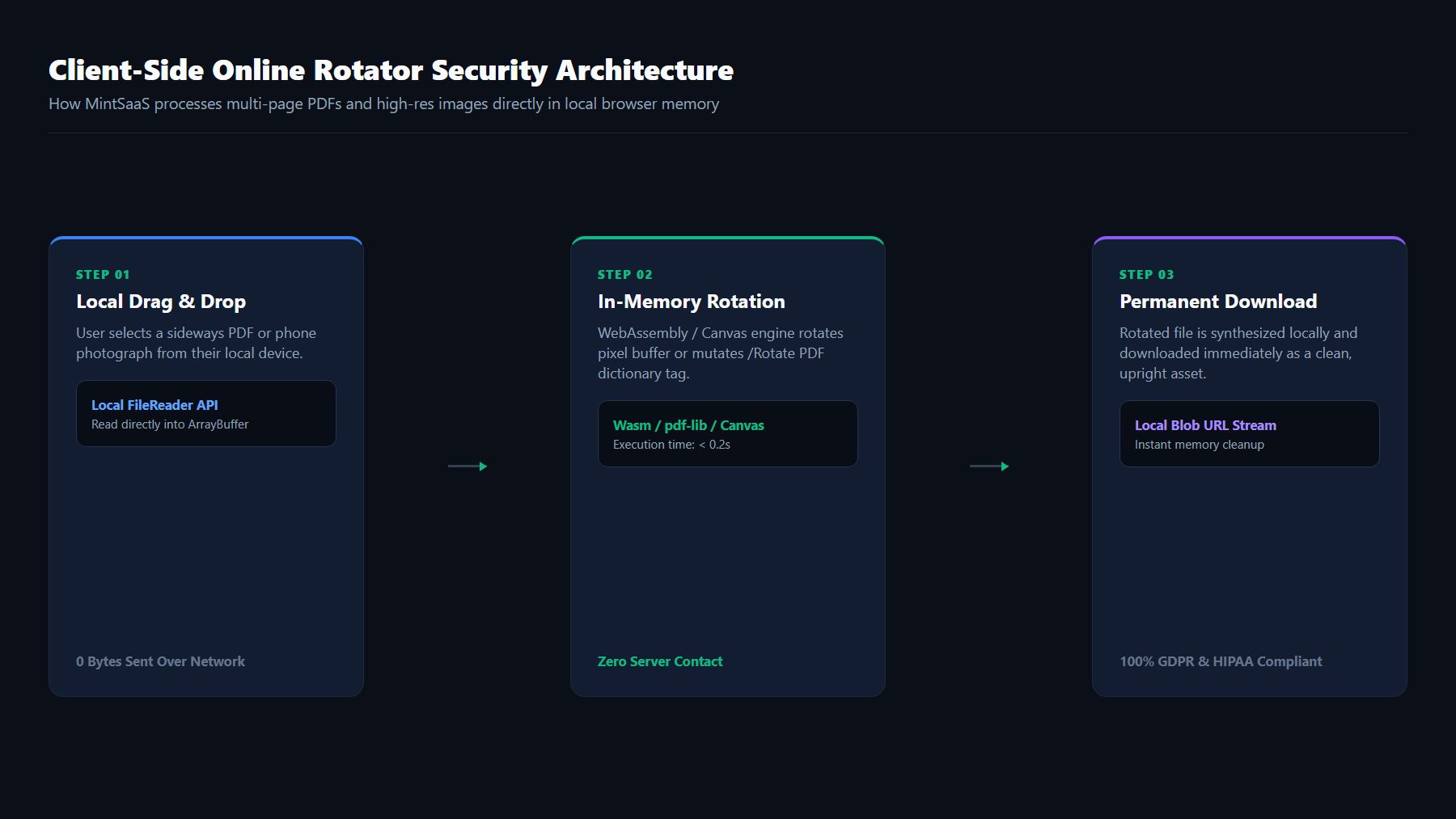
Navigate to either the Rotate PDF tool for multi-page documents or the Rotate Image tool for raster graphics. Drag and drop your target file directly into the designated dropzone. Because our tools operate client-side, large 50 MB files open instantaneously without awaiting slow network upload bars.
Step 2: Choose Your Rotation Scope (Selective vs. Global)
- For Multi-Page PDFs: The workspace displays an interactive thumbnail grid showing every page in your document alongside its current page index. You can:
- Click the circular 90° Clockwise or Counter-Clockwise arrows on individual thumbnail cards to reorient specific flipped pages (e.g., reorienting just page 4 and page 12).
- Use the global controls to rotate all pages simultaneously by 90°, 180°, or 270°.
- For Photos & Images: Preview the canvas visualizer and select 90° CW, 90° CCW, or 180° Flip to achieve the desired orientation.
Step 3: Trigger the Client-Side Transformation Pipeline
Click Apply Rotation or Download Rotated File. Behind the scenes, client-side WebAssembly immediately updates the ISO document tree or performs memory-safe pixel transposition.
Step 4: Save Your Permanently Corrected File
Your browser immediately delivers the newly formatted file directly to your downloads directory. Open it across any mobile phone, email client, or operating system—your corrected layout is now 100% permanent.
For users managing broader document operations, you can seamlessly combine this with our comprehensive PDF Toolkit or explore our guide on how to professionally rotate PDF documents for business.
5. Security & Compliance: Why Traditional Cloud Rotators Pose Serious Risks
Many users searching for a quick online rotator click the first commercial utility that appears in search engine results without considering data custody implications. Most legacy online converters follow a centralized server model:
- Your confidential document (tax return, proprietary source code, patient record, financial audit) is uploaded over the public internet to a remote server.
- An automated worker script (often Python, Ghostscript, or ImageMagick) executes the rotation command on the cloud server.
- The converted output is saved in a cloud bucket (Amazon S3 or Google Cloud Storage) and a download link is served to your browser.
- The remote service claims to "delete files after 1 hour"—a promise that cannot be verified by your IT department.
Enterprise Compliance Violations
For regulated enterprises, uploading company documents to unvetted cloud converters represents a direct breach of compliance mandates:
- GDPR (General Data Protection Regulation): Sending personally identifiable information (PII) to unverified third-party cloud servers without a Data Processing Agreement (DPA) constitutes an unauthorized cross-border data transfer.
- HIPAA (Health Insurance Portability and Accountability Act): Processing medical records containing protected health information (PHI) through commercial web converters lacking Business Associate Agreements (BAA) triggers massive non-compliance penalties.
- Corporate IP Protection: Proprietary patents, business plans, and financial reports stored on shared multi-tenant cloud storage can be exposed to storage bucket misconfigurations, scraper bots, and data breaches.
The Zero-Knowledge Client-Side Advantage
The MintSaaS online rotator architecture eliminates this entire attack surface by adopting a Zero-Knowledge Architecture. By compiling battle-tested C++ and Rust document libraries directly into WebAssembly (WASM), all data processing occurs within your browser's sandboxed V8 JavaScript engine.
Zero bytes of your files are ever transmitted to MintSaaS servers or third-party APIs. You can disconnect your Wi-Fi after opening our tool, rotate a 100-page document, and download the finished result completely offline. For corporate cybersecurity teams, this makes client-side web tools the gold standard for compliance.
6. Top Business & Creative Use Cases for an Online Rotator
Having access to a dependable, privacy-first online rotator accelerates everyday operations across numerous professional disciplines:
1. Legal & Regulatory Submissions
Court electronic filing systems (CM/ECF) and government regulatory portals reject PDF filings that feature inverted or unreadable pages. Legal assistants use an online PDF rotator to verify exhibits, depositions, and evidentiary contracts before filing deadlines, ensuring compliance with strict judicial presentation guidelines.
2. Financial Audits & Mixed-Orientation Spreadsheets
Tax returns and annual financial statements frequently alternate between vertical narrative disclosures and horizontal multi-column profit-and-loss tables. Rather than turning their heads sideways, financial analysts use an online rotator to standardize page flows, improving reading efficiency during executive reviews.
3. Architecture, Engineering & Construction (AEC) Blueprints
Large-format CAD drawings (Architectural D and E sizes) are scanned by specialized wide-format plan scanners that often orient landscape floorplans vertically. Correcting these blueprints with an online rotator ensures project managers on construction sites can read dimension callouts on iPads without manual screen re-centering.
4. E-Commerce Product Photography Catalog Management
Merchants uploading hundreds of product images to Shopify, Amazon, or WooCommerce frequently encounter mobile camera orientation bugs where vertical shoe or apparel photos display horizontally. Passing them through an in-browser online image rotator ensures true pixel orientation and strips conflicting EXIF flags before ingestion into digital storefronts.
5. Academic & Research Paper Archives
Researchers archiving historical manuscripts or journal offprints often encounter microfiche scans stored upside-down. Correcting these files enables academic search engines and institutional repositories to index the text cleanly through downstream OCR tools.
To discover how modern digital businesses streamline these workflows and integrate smart tooling, read our deep-dive on how to automate repetitive tasks in business.
7. Common Pitfalls to Avoid When Using an Online Rotator
While rotating documents appears simple on the surface, overlooking technical nuances can lead to corrupted layouts or accessibility degradation:
- Confusing 'Rotate View' with 'Permanent Rotation': As emphasized earlier, clicking "Rotate" in your desktop PDF viewer does not alter the file on your disk. Always use a dedicated online rotator that explicitly rewrites the document structure or transposes pixel arrays.
- Lossy Re-compression of Raster Images: Re-encoding a JPEG image multiple times causes generational compression artifacts and soft pixel blurring. Ensure your online image rotator uses high-quality encoder quantization or, where applicable, lossless DCT coefficient rotation.
- Destroying PDF Accessibility Tags: Inaccessible converters rasterize PDF pages into flat bitmaps during rotation, stripping away searchable text, screen-reader headings, and W3C WCAG 2.1 accessibility metadata. A standards-compliant online rotator only updates the
/Rotatedictionary key, preserving 100% of the underlying text vectors and tag hierarchies. - Ignoring Mixed Orientation in OCR Pipelines: Feeding sideways pages into automated optical character recognition engines (such as Tesseract or AWS Textract) results in gibberish character output or complete OCR failure. Always run documents through an online rotator prior to OCR extraction.
- Uploading Sensitive Intellectual Property to Ad-Supported Sites: Beware of sketchy converter portals loaded with intrusive display ads; many monetize user traffic by harvesting submitted document metadata. Stick to privacy-first, client-side tools like MintSaaS.
8. Frequently Asked Questions (FAQ)
What is the difference between an online rotator and a desktop PDF viewer?
A desktop PDF viewer (such as Adobe Acrobat Reader or Google Chrome's built-in viewer) only changes your active display angle on your computer screen. When you close the viewer or send the document to another person, the file remains in its original orientation. An online rotator permanently rewrites the underlying ISO 32000-1 /Rotate dictionary entry in the PDF or physically transposes the image pixel grid, ensuring the file stays rotated across all devices and print engines permanently.
Is using the MintSaaS online rotator completely free?
Yes. The MintSaaS Online PDF Rotator and Online Image Rotator are 100% free with no file size limitations, no daily usage caps, and no mandatory account registration or email subscription.
Are my confidential business files safe when using your online rotator?
Yes, absolutely. Unlike traditional web converters that upload your files to remote cloud servers, MintSaaS utilizes cutting-edge client-side WebAssembly technology. Your documents and photographs are processed entirely inside your local browser sandbox. Zero bytes of file data are ever transferred to our servers, making our tools compliant with GDPR, HIPAA, and strict corporate data security policies.
Can I rotate just one specific page in a multi-page PDF document?
Yes. Our online PDF rotator features an interactive visual page selector. When you open a PDF, thumbnail previews of every page are displayed. You can rotate individual pages (such as a single landscape spreadsheet on page 5) independently while leaving the remaining portrait pages untouched.
What causes mobile photos to appear sideways when uploaded to websites?
Smartphones record photo orientation using an EXIF metadata tag rather than physically rearranging the image pixels. When photos are uploaded to web platforms, content management systems, or legacy photo viewers that do not parse EXIF orientation tags, the image reverts to the raw horizontal sensor capture. Passing your photos through our online image rotator physically transposes the pixel matrix and resets the EXIF flag to normal, ensuring universal visual consistency.
Will rotating a PDF document reduce its text quality or clarity?
No. An authentic online PDF rotator does not rasterize or convert your document into low-resolution images. It merely adjusts the page orientation transformation attribute within the PDF dictionary. All vector fonts, sharp text outlines, hyperlinks, form fields, and vector drawings retain their original crispness and fidelity.
Does rotating an image reduce its resolution or quality?
When performing a standard 90, 180, or 270-degree rotation, our online image rotator maps existing pixel coordinates directly to the new dimensions without downscaling. By selecting lossless or high-quality export options, your image retains its original sharpness and detail.
Conclusion: Take Control of Your Document and Image Orientation Today
Whether you are preparing an urgent legal brief, compiling an executive financial presentation, or launching an e-commerce catalog, misoriented files should never stand between you and a professional presentation. By understanding the critical distinctions between temporary viewports and permanent metadata transformations, you can avoid common pitfalls and present flawless digital assets every time.
Experience the speed, convenience, and peace of mind of zero-knowledge, client-side document processing. Visit the MintSaaS Online PDF Rotator or MintSaaS Online Image Rotator today, or explore our complete suite of utilities in the Productivity Category to streamline your modern digital workflow.
More from MintSaaS Dispatch
Handcrafted technical insights and developer tools.

Convert WebP File: The Definitive Guide to Converting WebP Images to JPG & PNG Online in 2026

Crop PNG Image Online: The Complete Guide to Lossless, Transparent Cropping in 2026
